Browse Assistive Technology
Products
-

I-M-ABLE: Individualized Meaning-Centered Approach to Braille Literacy Education(EPUB)
$34.95
I-M-ABLE is a teaching method for braille literacy that is built around each student's own interests and needs. It is meant for children who find learning braille hard, and it aims to make braille lessons more engaging. This version is a digital EPUB book, so you will need an EPUB reader app or program to open it, and it is written as a guide for the adults who teach rather than as a workbook for the child.
Verified 3 days agoProfessional guidance helps -

Scanmarker Reader Scanning Pen
$199.00
The Scanmarker Reader is a pocket-sized pen that you slide along a line of printed text, and it reads that line aloud through an app on a computer or smartphone. It works with 6 to 24 point print and more than 70 languages, and on screen you can change the voice, reading speed, font size, colors and spacing to make the text easier to follow. It can read as you scan or after the scan is done, and it comes with a guide that helps the pen stay on one line. It connects by Bluetooth, so the computer or phone needs Bluetooth 4.1 and an internet connection. It scans one line at a time, so it suits short passages better than long documents.
Verified todaySetup with instructions -
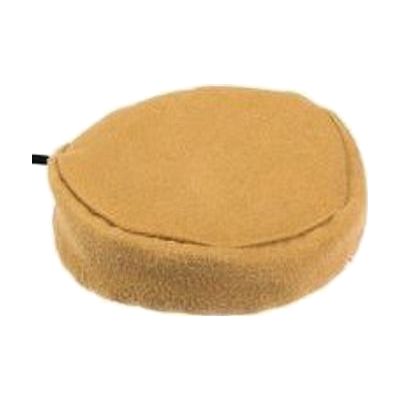
Pillow Switch
$140.00
The Pillow Switch is a soft, smooth switch that someone can press with the head, cheek, or another body part, with a light touch. It plugs in through a 3.5mm mono switch jack, so it can operate compatible communication aids, toys, and other switch-accessible technology. It fastens to a pillow or wheelchair cushion with a safety pin and Velcro, which puts it right where the person's head or cheek rests. This is only the switch. You'll need a switch-accessible device to plug it into, and a therapist can help with choosing a good spot and checking that the person can activate it reliably.
Verified 4 days agoProfessional guidance helps -

Physical Education and Sports for People With Visual Impairments and Deafblindness: Foundations of Instruction(EPUB)
$65.95
This second-edition guide helps teachers and other instructors plan physical education, recreation, and lifelong fitness for people who are blind, have low vision, or are deafblind. It covers how to adapt physical skills instruction and sports or other activities, and it stresses self-advocacy. It covers instruction for all ages. This is a digital book file, so you'll need an EPUB reader app or device to open it.
Verified 3 days agoProfessional guidance helps -
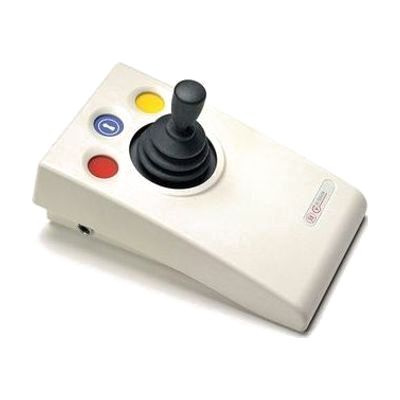
it-Stick Wireless Joystick
Est. $150–$350
The it-Stick is a wireless joystick that moves the cursor on a computer or tablet, for someone who finds a mouse or trackpad hard to control. It responds to a very light touch, so it can suit a person with limited strength or range of movement. It has left-click, right-click, and drag lock buttons, four cursor speed settings, and sounds that confirm each action. It works with Windows, Mac, Chromebook, iPadOS, and iOS, and the built-in battery recharges over USB. The it-Receive receiver is required and isn't in the box with the joystick alone. It comes in the Starter Pack, and it reaches about 10 metres from the receiver.
Verified 4 days agoSetup with instructions -

Big Track Mouse Ball
$100.00
The BIGtrack is an oversized trackball mouse. You move the cursor by rolling a giant yellow 3-inch ball with your palm or fingers, so there is no need to grip and slide a standard mouse. The left and right click buttons are bright blue and sit behind the ball, which helps prevent accidental clicks while you position the cursor. It suits someone with weak hands, trouble with fine finger movements, or limited vision, and it also works for young children building hand-eye coordination. The bold colors make it easy to see and can help hold attention.
Verified todaySetup with instructions -
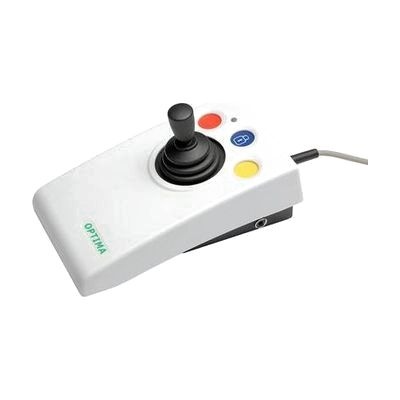
OPTIMA Joystick
Est. $150–$350
The OPTIMA Joystick is a computer joystick that moves the cursor with a light touch, for people who find a standard mouse hard to grip or control. It comes with three interchangeable handles, so you can pick the shape that suits the hand, and the wide base and built-in hand rest help it stay steady during long sessions. Colour-coded, recessed buttons handle left click, right click, and drag lock, and there are sockets for plugging in remote switches. It has four cursor speeds, with a sound each time you change the setting, and it works with PC, Mac, and iOS or iPadOS devices through Switch Control. Because it replaces the mouse, the right handle and speed may take some trial and error to find.
Verified 4 days agoSetup with instructions -

A Parents' Guide to Special Education for Children with Visual Impairments (EPUB)
$24.95
This handbook walks parents, family members, and caregivers through the special education services that children with visual impairments are likely to need and are entitled to receive. It also explains how to make sure those services actually happen. This is the digital EPUB edition, so you'll read it on a phone, tablet, or computer with an EPUB reader app.
Verified 3 days agoReady to use -

Reading Connections: Strategies for Teaching Students with Visual Impairments(EPUB)
$34.95
This is a digital guide on reading instruction for students who are visually impaired, written for teachers and other professionals. It covers strategies for building reading skills and is meant to be used as a reference when planning how to teach. It comes as an EPUB file, so you'll read it in an EPUB reader app or program rather than on paper.
Verified 3 days agoProfessional guidance helps -
NaturalReader
Free plan · paid up to $159 every year
NaturalReader is text-to-speech software that reads documents, PDFs, images and web pages out loud, and it can save the audio as an MP3. Its camera scanner reads printed text, and the Chrome extension reads web pages, emails and PDFs, and can read your own writing back in Google Docs so you can catch mistakes by ear. It works as a web app, on iOS, Android and desktop, so it suits students or adults who find reading easier by listening, or who have trouble seeing small print. There is a free plan, but the paid plans are billed yearly, so check what each level includes before you commit.
Verified 4 days agoSetup with instructions -

Teaching Social Skills to Students with Visual Impairments: From Theory to Practice(EPUB)
$34.95
This is a digital book, in EPUB format, about teaching social skills to students who have visual impairments. It is written for the teachers and specialists who plan that instruction, and it connects theory to classroom practice. The book comes as an electronic file, so you need an EPUB reader app or program to open it. It is not a program a student uses on their own.
Verified 3 days agoProfessional guidance helps -
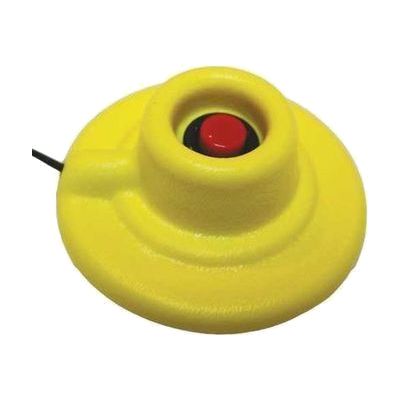
Finger Isolation Button
$69.95
This small switch has a button set down inside a recessed opening, so a person has to point and press with one finger to activate it. That design gives you a way to practice finger isolation and fine motor control, the skills behind using a computer or touchscreen. It measures about 3 inches deep and 1.5 inches high and weighs 3 ounces. Like any switch, it does nothing alone: it works only when plugged into a switch-accessible device, toy, or computer interface.
Not recently verifiedProfessional guidance helps -
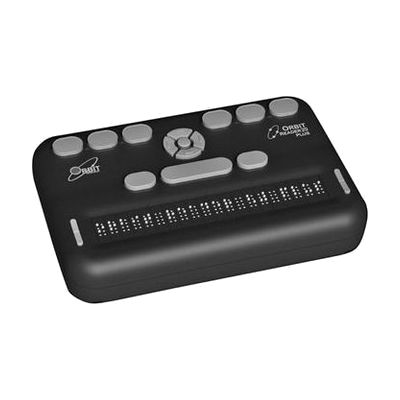
Orbit Reader 20 Plus
$899.00
The Orbit Reader 20 Plus is a 20-cell, eight-dot braille device that works three ways. You can use it by itself as a note-taker or book reader, or connect it to a computer or phone by USB or Bluetooth and use it as a braille display for a screen reader. It translates text into braille and back again on the device, with support for 40+ languages. It also has a clock and alarm, a calendar, and a calculator. It has eight braille input keys, panning keys at each end of the display, an SD-card slot, and a rechargeable battery. It's a good fit for someone who already reads braille and wants one portable tool for notes, books, email, and web browsing. The connected-device features work with Android, iOS, Windows, Fire OS, Chrome, and Linux.
Verified todaySetup with instructions -
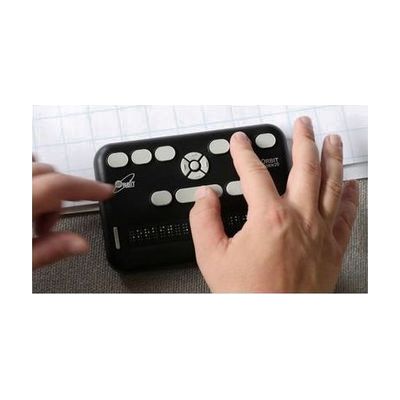
Orbit Reader 20
$799.00
The Orbit Reader 20 is a small refreshable braille device with 20 eight-dot cells that does three jobs. On its own, it reads books and files from an SD card (BRF, BRL, or text) and works as a note-taker using its Perkins-style 8-key braille keyboard. Connected to a computer, phone, or tablet by USB or Bluetooth, it becomes a braille display for a screen reader, so you can read and send messages, check email, and browse the web. It works with common screen readers on Windows, Mac, iOS, Android, and Chrome, and weighs under a pound. Twenty cells show only a short line of braille at a time, so you pan through longer text with the navigation keys.
Verified todaySetup with instructions -
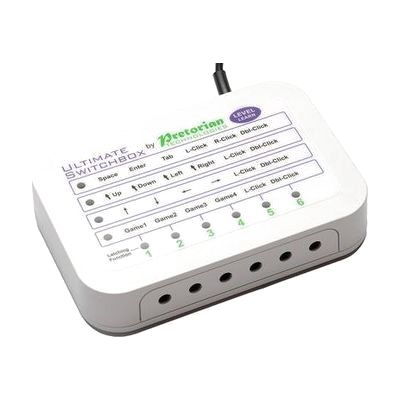
Ultimate Switchbox
Est. $150–$350
The Ultimate Switchbox is a USB switch interface that lets up to six switches control a computer as if they were keyboard keys, mouse buttons, or gamepad buttons. Each socket can be set to a single key, a modifier like Shift or Control, a mouse click or cursor move, or a short macro of up to four keystrokes. Settings are spread across four levels, so one set of switches can do different jobs, and a seventh socket or an onboard button changes levels. It works without extra software and comes with default settings that often need no changes. This is the interface only, so you'll need your own switches and a computer, and finding the right mapping for a particular user is where an ATP, OT, or SLP helps most.
Verified 4 days agoProfessional guidance helps -
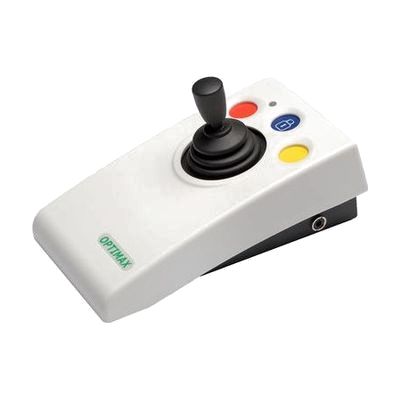
OPTIMAX Wireless Joystick
Est. $150–$350
The OPTIMAX Wireless Joystick lets someone steer a computer or tablet cursor with a light touch, without needing a mouse grip or a cable. It comes with three interchangeable handles, so you can try different shapes to find one that suits the person's hand and control. It has four cursor speed settings and a low, wide base that gives the hand a natural rest and keeps the unit steady. The buttons are recessed so they are hard to press by accident, and there are sockets for plugging in external left and right click switches. The wireless range is over 10 metres, and the joystick works with PC, Mac, iPadOS and iOS.
Verified 4 days agoSetup with instructions -
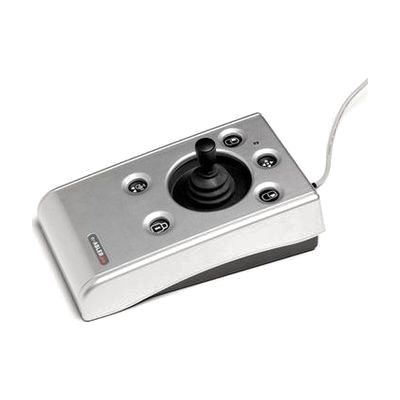
n-ABLER Pro Joystick
Est. $150–$350
The n-ABLER Pro Joystick is a USB joystick that takes the place of a mouse for people who find a standard mouse hard to grip or steer. It has a wide, stable base with a built-in wrist support, and you can swap between a soft ball handle and a T-bar handle to find a comfortable grip. Three anti-tremor settings filter out shaky movement so the cursor stays steadier. Buttons can be switched between left and right click, and it offers double-click, a latching drag lock, and sound or visual feedback. A pan button helps with moving around documents. It connects by USB to PC and Mac with no drivers, and to an iPhone or iPad through an adapter, where it works with Switch Control. Plan to try the tremor level and handle that suit the user, since that choice affects how well it works.
Verified 4 days agoSetup with instructions -
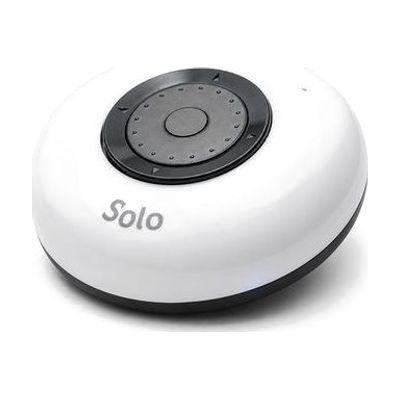
Solo Wheel
Est. $60–$150
The Solo Wheel is a small wireless controller that connects to a tablet or smartphone over Bluetooth. A central wheel scrolls through items on screen, and a select button chooses the highlighted one. That makes it a simple way to move around a device for someone who finds touching the screen difficult. It is a complete input device on its own, but you will need to pair it and set up your device to work with it before it is useful.
Verified 1 week agoSetup with instructions -

Instructional Strategies for Braille Literacy(EPUB)
$41.95
This is a digital book (EPUB format) for teachers and other professionals who teach braille. It explains how students develop literacy and braille skills, and it lays out specific strategies and methods for teaching braille. You'll need an EPUB reader app or program to open it, and free ones are available. It's a teaching guide for the adult doing the instructing, not a workbook for students to use themselves.
Verified 3 days agoProfessional guidance helps -

Clevy Mouse
Est. $25–$60
The Clevy Mouse is a small USB computer mouse made for children who are just starting to use a computer or tablet. The left button is blue and the right button is red, so a child can tell left-click from right-click by color. It measures about 10 x 5.5 x 3.5 cm, which suits small hands. You plug it in by USB and it works with Windows, Mac, and iPad or iPhone, where it can also be used with iPadOS and iOS accessibility features like Switch Control.
Verified 4 days agoReady to use -
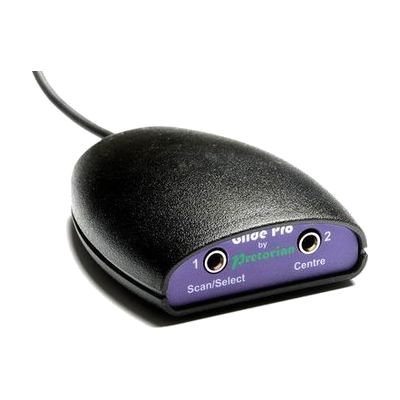
Glide Pro
Est. $150–$350
The Glide Pro is a switch interface that lets someone move the cursor on a computer, tablet, or phone using switches instead of a mouse or touchscreen. It plugs in and runs without any software, and it works with PC, Mac, Chromebook, iOS, and Android devices. This is a way to reach the device, not a full solution on its own: you'll need to supply your own switches, and getting the right switch type and placement for the person using it takes some trial and error.
Verified 4 days agoSetup with instructions -
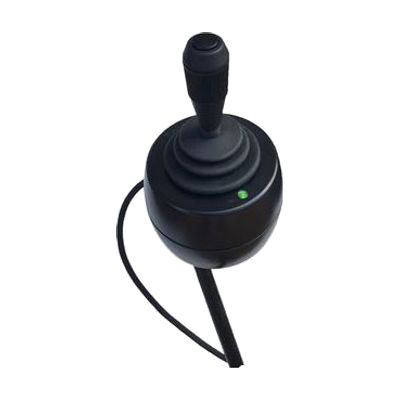
PointIt! Pro Joystick
Est. $150–$400
The Point-It! Pro Joystick lets someone move the cursor on a computer or smart device by pushing a joystick instead of using a mouse. A switch on top of the stick handles left-clicks, and you can reach the other mouse buttons through the joystick too. It has two 3.5mm jacks for plugging in outside switches, and you can swap the knob for another style, such as a ball or a chin cup, to match how the person can best reach and control it. The wired version works with Windows and Mac. A Bluetooth version also works with iOS and Android and includes a mounting ring. On the wired model, the mounting ring is sold separately.
Verified 4 days agoProfessional guidance helps -
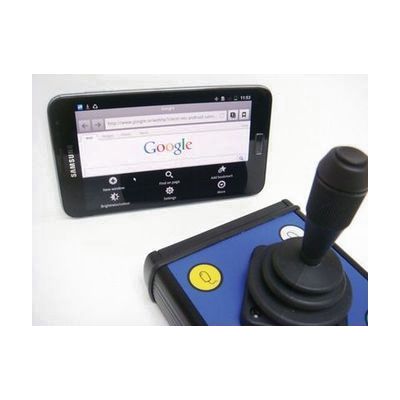
PointIt! Bluetooth Joystick
Est. $150–$350
The Point-It! Bluetooth Joystick lets you move a cursor with a joystick instead of a mouse. It gives smooth, proportional movement, so a small push moves the cursor a little and a bigger push moves it more. It connects wirelessly over Bluetooth to Windows, Mac, and iOS devices as a standard Bluetooth mouse. On an iPad or iPhone it can also drive Switch Control. It's a good fit if gripping and sliding a mouse is hard and you want a different way to steer the pointer. A built-in rechargeable battery powers it, and the compact body travels easily. It's one input device, so you'll still need a computer or iOS device to use it with.
Verified 4 days agoSetup with instructions -
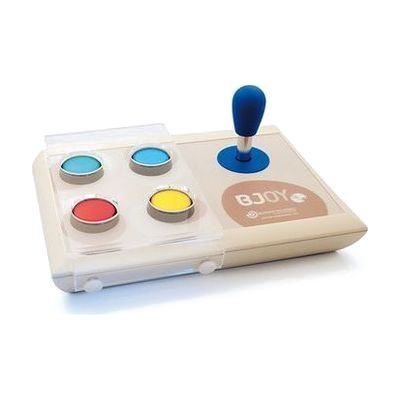
JoyStick-C
Est. $150–$400
The JoyStick-C is a desktop joystick that works as a computer mouse for someone who can't use a standard mouse. It has four large, colored buttons that can be set up for left click, right click, drag-and-drop, or double-click, and each one can also be set to do nothing. Free configuration software lets you adjust speed, sensitivity, sound feedback, and button layout, and there are changeable covers and labels so buttons are easy to tell apart. It also has four 3.5mm sockets for plugging in your own external switches (not included), plus a removable plastic keyguard to help prevent accidental presses. It's a bigger unit, about 29 x 22 x 16 cm, with a non-slip base meant for desktop use.
Verified 4 days agoProfessional guidance helps