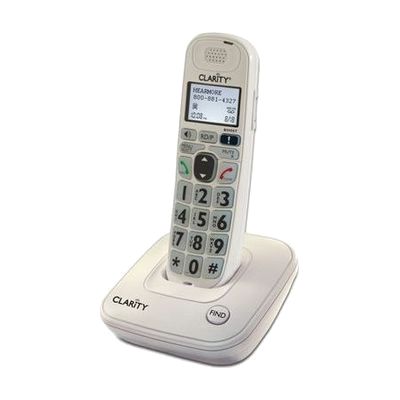
Clarity D704 Amplified Low Vision Big Button Cordless Phone- 40dB
by Clarity
Last verified July 29, 2026 · classified April 26, 2026
What it is
Summary
AI-generated from vendor-published content · April 26, 2026
The Clarity D704 is a cordless home phone designed for people who struggle to hear callers or see standard phone buttons clearly. It amplifies incoming sound by up to 40dB — roughly 20 times louder than a typical home phone — and uses noise-reduction processing to cut down on background interference and distortion. The keypad features large, high-contrast numbers with backlighting for low-light use, and the Caller ID display uses an unusually large font compared to most cordless phones. This is a complete, ready-to-use home phone system that includes a digital answering machine and speakerphone; the main limitation to know is that while it can expand to up to five handsets, additional handsets are sold separately.
Quick Facts Catalog facts · auto-generated
- AT Act lending
- Medicaid waiver
- Out of pocket
What Setup Looks Like
- Out of the box
- Place the base unit near a phone jack and power outlet.
- Connect the phone line and power adapter to the base.
- Charge the handset for the recommended time before first use — phone is ready to make and receive calls after charging.
- With a guide
- Set volume amplification level and tone settings via the phone menu to match the user's specific hearing needs.
- Program frequently called numbers into speed dial.
- Configure the answering machine greeting and sensitivity. Allow 15–30 minutes total. See manufacturer support resources for detailed instructions.
Getting it
Try Before You Buy
Devices like this are often available to borrow through your state's AT Act program — typically free or low-cost — so you can try it before buying or pursuing funding.
Where to Get It
This is the vendor WhatCanHelp tracks for this product — it may also be available from other retailers or a local supplier, and prices vary.
Some links may be affiliate links — WhatCanHelp may earn a small commission from purchases at no extra cost to you. More on affiliates →
As an Amazon Associate we earn from qualifying purchases.
How to Fund This
Equipment like this is often pursued through official state programs. These are common starting points — each program decides its own eligibility and what it covers, so the first step is always a phone call.
Compare & explore
Sources & fine print
Vendor facts (name, price, platforms, vendor link) sourced from Clarity — view on vendor site; last verified July 29, 2026.
Classification & description AI-generated from vendor-published content on April 26, 2026 · confidence: high. Vendor specs may lag; verify before relying on details in a clinical or funding artifact.