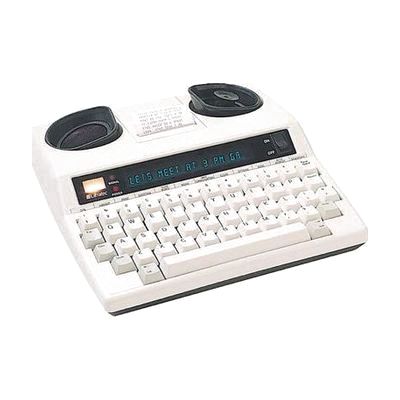
Ultratec Superprint 4425
by Ultratec
Price is what the vendor listed when last checked. Confirm it with the vendor before buying.
Last verified September 18, 2026 · classified April 26, 2026
What it is
Summary
AI-generated from vendor-published content · April 26, 2026
The Superprint 4425 is a full-featured TTY (text telephone) that lets people who are deaf or hard of hearing make and receive phone calls by typing and reading text over a standard phone line. It's designed for someone who uses TTY as their primary phone communication method and wants capabilities beyond a basic unit — things like auto-answer with message recording, a 32K memory for storing contacts and memos, and Turbo Code for faster real-time back-and-forth conversations with other Turbo Code TTYs. This is a standalone dedicated device with its own keyboard and display that connects directly to your phone line via two built-in jacks — no computer or smartphone required. TTY technology has declined significantly with the spread of smartphones and relay apps like CapTel and IP Relay, so consider whether a TTY fits your current communication ecosystem before purchasing at this price point.
Quick Facts Catalog facts · auto-generated
- AT Act lending
- Medicaid waiver
- Out of pocket
- Vocational rehab
What Setup Looks Like
- Out of the box
- Plug the device into a standard phone line jack using the built-in direct-connect cable.
- Power on and begin typing — the unit is ready to send and receive TTY calls immediately.
- With a guide
- Program your personal greeting, auto-answer message, and relay service phone number using the menu system.
- Enter frequently called numbers into the 32K memory directory using the keyboard.
- Configure Turbo Code speed settings if communicating with other Turbo Code TTY users — allow 30–60 minutes for full personalization. See manufacturer support resources for detailed instructions.
Getting it
Try Before You Buy
Devices like this are often available to borrow through your state's AT Act program — typically free or low-cost — so you can try it before buying or pursuing funding.
Where to Get It
This is the vendor WhatCanHelp tracks for this product — it may also be available from other retailers or a local supplier, and prices vary.
Some links may be affiliate links — WhatCanHelp may earn a small commission from purchases at no extra cost to you. More on affiliates →
As an Amazon Associate we earn from qualifying purchases.
How to Fund This
Equipment like this is often pursued through official state programs. These are common starting points — each program decides its own eligibility and what it covers, so the first step is always a phone call.
Compare & explore
Sources & fine print
Vendor facts (name, price, platforms, vendor link) sourced from Ultratec — view on vendor site; last verified September 18, 2026.
Classification & description AI-generated from vendor-published content on April 26, 2026 · confidence: high. Vendor specs may lag; verify before relying on details in a clinical or funding artifact.