Communication — assistive technology
Products that supplement or replace spoken language — AAC devices, speech-generating apps, picture boards, and voice amplifiers for people with complex communication needs.
Browse by type
- Speech devices and communication boards 130
- Communication apps and software 81
- Switches & buttons 112
- Eye gaze and alternative access 65
- Mounts for devices and switches 33
A product can fit more than one type, so these counts add up to more than the total.
Core picks
A starting set that shows the range, from simple tools to specialist devices. Not a ranking, and not a recommendation for any one person.
-

Cboard
Free
Cboard is a free AAC app that runs in a web browser. It lets someone communicate by tapping pictures, photos, or words on a board, and the app then speaks them aloud. Two symbol libraries are built in (Mulberry and ARASAAC), and you can build your own boards with your own symbols, photos, or text. It supports more than 40 languages and can be installed as an offline-capable web app, so it keeps working without an internet connection. Because it's software, you'll supply the phone, tablet, or computer yourself, and the boards will only be as useful as the vocabulary someone sets up in them.
Verified 4 days agoSetup with instructionsA free, browser-based symbol board that speaks aloud — a no-cost way to try AAC before buying.
-

Apple Live Speech & Personal Voice
Free
Live Speech lets you type what you want to say and have your device say it out loud, including during Phone and FaceTime calls and face-to-face conversations. You can save phrases you use often and group them into categories, such as a Coffee Shop set for ordering. You can pick from dozens of system voices or use a Personal Voice, which is a voice you create that sounds like you. Personal Voice is built by reading 10 randomized phrases aloud, and it's aimed at people who are at risk of losing their voice. These are built-in Apple features, so availability varies by device, region, and language.
Verified 3 days agoSetup with instructionsType and your Apple device speaks for you — Personal Voice can make it sound like you.
-
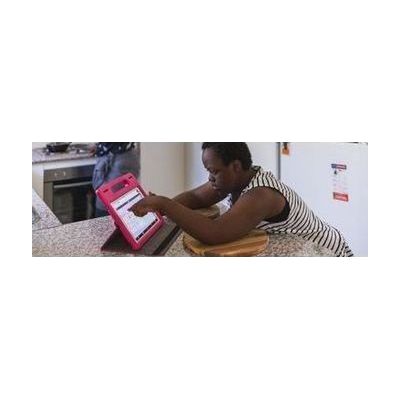
Proloquo2Go - AAC app with symbols - AssistiveWare
$124.99 – $249.99
Proloquo2Go is a symbol-based AAC app for iPad and iPhone that gives nonspeaking children and adults a way to speak out loud and start conversations. Because it can be personalized to fit different needs, it works for a wide range of communicators. Expect the app to be only part of the picture: a speech-language pathologist can help choose the right layout and vocabulary, and the person using it will need time and a communication partner who models using it.
Verified 4 days agoProfessional guidance helpsSymbol-based AAC app for iPad and iPhone, suited to early communicators through complex sentence builders.
-
BIGmack
$155.00
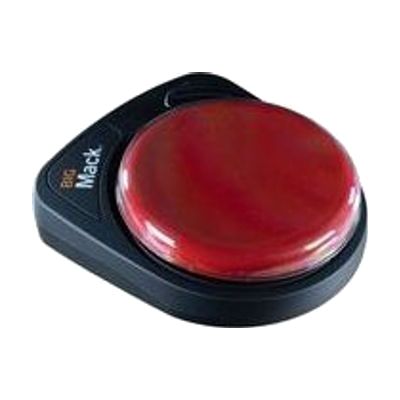
The BIGmack is a single-button communicator that plays back a recorded message each time someone presses its large button. It holds about 2 minutes of recording, so you can store a phrase, a sound, or a short story line. It's a good fit for someone who has limited hand control or who is just starting to learn that pressing a button gets a response. A toy/appliance jack with a cable is included, so the button can also run a connected toy or appliance for cause-and-effect play. It also has an external switch jack for people who need a different kind of switch to activate it. Four colored tops (red, blue, yellow, green) swap in to personalize it, and a 9V battery is included. It only plays one recorded message at a time, so it works best as a first step or as one piece of a bigger communication plan.
Verified 4 days agoProfessional guidance helpsOne big button plays a recorded message — a first step for single phrases or cause-and-effect.
-
GoTalk 9+ Lite Touch
$339.00
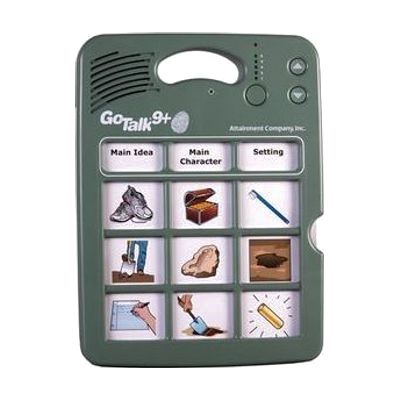
The GoTalk 9+ Lite Touch is a dedicated talking device with nine message keys. You record your own voice messages onto the keys, and each press plays one back. It holds up to 45 messages across five recording levels, with about nine minutes of total recording time, and its keys respond to a much lighter touch than standard GoTalk models, which helps someone with a gentle or limited press. People can use it to start conversations, make requests, answer questions in class, or greet visitors in a hospital room. It has volume control, a record lock and a level lock, and it stores its overlays inside the device. Because every message is recorded by someone, the vocabulary only works as well as it is planned, so it helps to have a speech-language pathologist or teacher decide what goes on each level.
Verified 2 days agoProfessional guidance helpsNine picture keys play back recorded messages across five levels — reliable speech output without a tablet.
-

ChatterVox 100 Waistband Amplifier HC-CV-1 HC-CV-2 HC-CV-3 HC-CV-4
$189.00
The Chattervox is a small, belt-worn voice amplifier that makes a quiet speaking voice louder, with up to 15 dB of boost. It suits someone with mild to moderate low-volume speech who wants a simple way to be heard in conversation. The only control is one knob that works as both the volume and the power switch, so it's easy to use day to day. It comes with six rechargeable AA batteries, a plug-in charger that can fully recharge overnight, a storage case, and a belt extender. One important detail: the microphone is not included, so you'll need to get one separately.
Verified 4 days agoSetup with instructionsA wearable voice amplifier for a voice too soft to carry, such as with Parkinson's.
-
Grid 3 from Smartbox
Price on request: ask the vendor
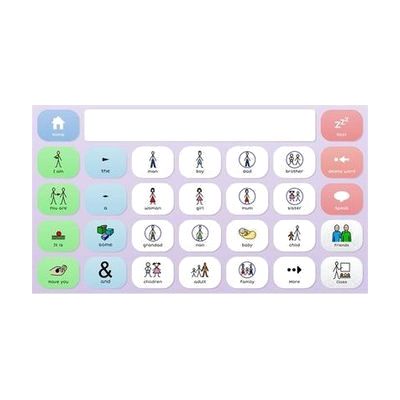
Grid 3 is AAC software, meaning it gives a person a way to speak and write with symbols or text on a screen. It can be used by touch, switch, a pointing device, or eye gaze, so it fits people with very different physical access needs. It starts with ready-made symbol grid sets and grows into text tools with on-screen keyboards and word prediction, so it can follow someone from early cause-and-effect play to advanced writing. It also covers more than talking: it includes 25 animated learning activities, built-in apps like email, SMS, YouTube, and Facebook, full computer control, and control of lights, doors, and TVs. That last feature needs compatible environmental control hardware. Grid pages can be edited and updated remotely, which helps a therapist or family member support the user without taking the device away.
Verified 4 days agoProfessional guidance helpsWindows software for communication and computer control by touch, switch, or eye gaze.
-

Accent
Est. $4,000–$8,000
The Accent is a dedicated AAC (augmentative and alternative communication) device, a speech-generating tablet that lets someone communicate through symbols, words, and typing. It runs on Windows and supports several ways of selecting, including eye tracking and switch access, so it can be matched to how a person can physically use it. The glass is thicker and impact-resistant, the body resists splashes and dust, and the handle is stronger. It can also act as a keyboard and mouse for a connected computer, or work as a standalone computer. The communication software, such as NuVoice, is customized to the person, so plan on professional help to choose and set it up.
Verified 4 days agoProfessional setup requiredA dedicated speech-generating device you can use by touch, switch scanning, or eye gaze.
Step-by-step guide
Getting a communication device: A step-by-step path from "a therapist mentioned AAC" to a funded communication device: learn the landscape, borrow before buying, match options, and find official funding programs.
More communication products
-

GoTalk Fit
Est. $79–$129
The GoTalk Fit is a small handheld device that speaks recorded messages when someone presses a picture square. You can set it up with 4 or 9 squares per level and use 3 levels, for up to 12 or 27 messages in all. Each message can run up to 20 seconds, and a different colored light shows which level you're on. It's a good fit for a learner who needs to share wants and needs, join in a lesson, or ask a question at school or out in the community. Because the overlay swaps out easily, you can reprogram it for a new class or activity during the day.
Verified 4 days agoSetup with instructions -
AAC Speak Helper
Free
AAC Speak Helper is a free Windows program that takes text you copy to the clipboard, then translates it, converts it between writing systems (such as Latin to Devanagari), and reads it aloud using text-to-speech voices from several providers. It's meant to be called from another AAC app on Windows that can run outside programs, so it helps most when someone needs to speak a language their AAC app's voices handle poorly. For example, a Ukrainian speaker could have their text turned into English for caregivers. It has no main window of its own, but a separate Configure app lets you set options and keep different settings files for different tasks. You'll need to run the server and client yourself and edit your pagesets to add a speak button, so it's not a plug-and-play tool.
Verified 4 days agoProfessional guidance helps -

Freedom
Est. $150–$350
The Freedom lets one switch control up to four different devices. You can move between them by holding the main switch down for a set time, or by tapping a second select switch. Each device plugs in through a standard 3.5mm switch jack, and you can program which channels are active so it skips any that are unused. The hold time is adjustable, and the keypad can be locked after setup so settings don't get changed by accident. Phones and tablets may need an extra adapter to connect, and the switch itself is sold separately.
Verified 4 days agoProfessional guidance helps -
Inclusive MultiSwitch 2
Est. $150–$350
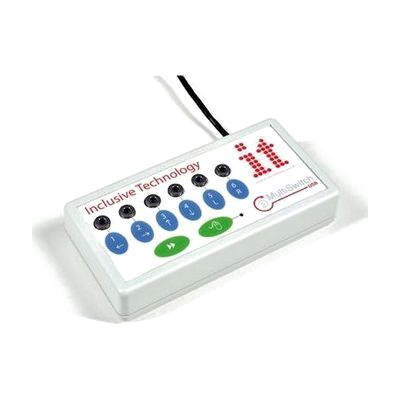
The MultiSwitch 2 is a USB switch interface that lets you plug in up to six assistive switches and use them with a computer. It detects which program is loading and sets up the switches for that program on its own. For software that isn't switch-accessible, the included programming software lets you map each switch to a mouse click, a key press, or an action like print or save. It can also move the mouse cursor with a switch, with four speed settings. This is the interface only, so you'll need to supply the switches, and building the right profile for a person takes some trial and error.
Verified 4 days agoProfessional guidance helps -

REHAdapt TableClamp OneHand Light
Est. $120–$280
The TableClamp OneHand Light clamps to the edge of a table and holds a tablet or other device at a position you can adjust. It tilts up to 90° vertically and turns a full 360° horizontally, and it holds devices from 0.7 to 3 kg (1.5 to 7 lbs). A two-lever quick release lets you attach or remove the device fast, and the small footprint keeps ports and screens clear. It fits REHAdapt's UDS mounting system, and VESA-mounted devices can use it too with a separately sold REHAdapt Mounting Plate.
Verified 1 week agoSetup with instructions -
GoTalk Everywhere
$50.00
GoTalk Everywhere is an AAC app, which means it gives someone a way to communicate through tapping buttons that speak or play recordings. It runs on iOS, Android, and the web, and it syncs communication pages across devices through the cloud. A therapist, teacher, or family member can build pages on the web and send them straight to the person who will use them. You get the basics: text-to-speech, voice recording, symbols, your own photos, and grid layouts from 1 up to 30 buttons per page. It's a good fit for someone who needs a simple, adjustable way to start communicating. The best results usually come from a speech-language pathologist helping choose the vocabulary and page layouts.
Verified 3 weeks agoProfessional guidance helps -

SoundingBoard
Est. $10–$50
SoundingBoard is an iPad, iPhone, and iPod touch app that turns the device into a communication board. You build boards with up to 20 message spots, using the built-in AbleNet symbols or your own photos. Each spot can hold a recorded message of almost any length, so a touch speaks a message in a voice you choose. It suits someone who needs to make choices or share simple messages and has a caregiver, teacher, or family member to build and record the boards. Because it runs on a larger iPad screen as well, the buttons can be made bigger. The app is also offered in French, German, and Spanish. Taking photos inside the app isn't supported on the previous-generation iPod touch or iPad 1.
Verified 4 days agoSetup with instructions -
Pillow Switch
$140.00
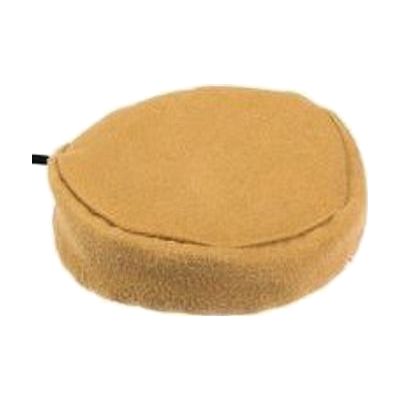
The Pillow Switch is a soft, smooth switch that someone can press with the head, cheek, or another body part, with a light touch. It plugs in through a 3.5mm mono switch jack, so it can operate compatible communication aids, toys, and other switch-accessible technology. It fastens to a pillow or wheelchair cushion with a safety pin and Velcro, which puts it right where the person's head or cheek rests. This is only the switch. You'll need a switch-accessible device to plug it into, and a therapist can help with choosing a good spot and checking that the person can activate it reliably.
Verified 4 days agoProfessional guidance helps -
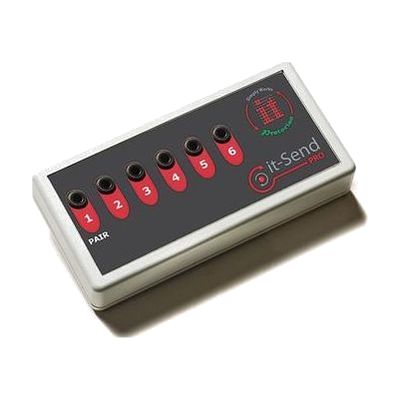
it-Send Pro
Est. $80–$200
The it-Send Pro lets you plug in up to six wired switches (the kind with 3.5mm jacks) and sends their presses wirelessly to a paired it-Receive, so the switches don't need a cable to the computer or toy. It works within about 10 metres, which gives you room to position switches wherever the person can reach them most comfortably. With the it-Receive and the supplied Switch Centre software, each switch function is set up automatically for Simply Works devices. For software that isn't in the database, you can build a custom profile. This is a piece of a larger system: you need the switches themselves, an it-Receive, and a Simply Works-compatible computer program or adapted toy to make it useful.
Verified 4 days agoProfessional guidance helps -
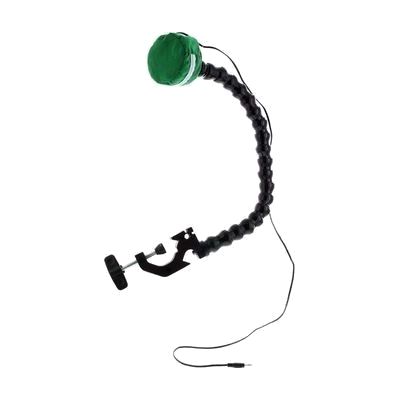
Pillow Switch on Easy Flex Mount
$125.95
This is a pillow switch attached to a flexible, clamp-on mount, so someone can activate a switch-controlled device by pressing a soft pillow. The mount clamps to a surface, and you bend the arm to put the pillow where the user can reach it most comfortably. It takes a light touch, around 35 to 40 grams of force, which suits someone who can't press a hard button. The arm is about 20 inches long and the whole set weighs about a pound. It's only the input piece. You'll need a switch-adaptable toy, communicator, or other device to plug it into.
Not recently verifiedProfessional guidance helps -
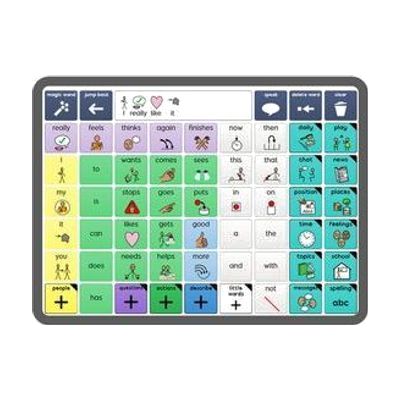
Grid for iPad from Smartbox
Est. $99–$349
Grid for iPad is an AAC app, which means it helps someone who can't rely on speech to communicate by speaking for them from the iPad. It's built as a full communication platform, with ready-made resources for both symbol-based and text-based communication, so it can fit someone who builds messages from pictures as well as someone who types. You get a library of resources included. It runs on an iPad, so you'll need one, and picking a vocabulary layout and setting it up for the person's needs goes more smoothly with input from a speech-language pathologist.
Verified 4 days agoProfessional guidance helps -

Ping Pong Switch
Est. $35–$75
The Ping Pong Switch is a light-touch switch that needs very little force to activate. That makes it a fit for someone with limited movement who can reliably press with a small motion, such as a head movement. It's built to resist water and moisture and to hold up to daily use at school, in therapy, or at home. It plugs into any device with a 3.5mm mono switch input. A mounting set (gooseneck arm, Super Clamp, and Mini Ball & Socket mount) is offered as an option so you can position it exactly where the user can reach it. On its own it's just the switch, so it only does something once it's connected to a switch-accessible device.
Verified 4 days agoProfessional guidance helps -
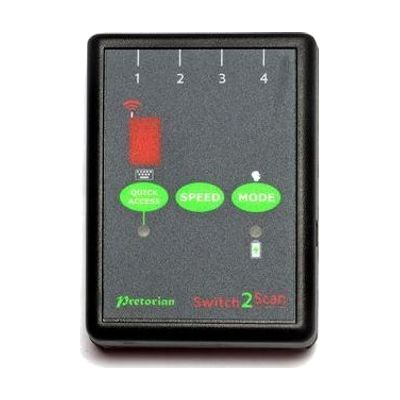
Switch2Scan for iPad
Est. $150–$350
Switch2Scan is a small Bluetooth switch interface that lets someone control an iPad using one or more wired switches instead of touching the screen. It scans through items on screen, either automatically or one step at a time by hand, so it works for apps, turning pages in iBooks, and typing on the on-screen keyboard. You can plug in up to four wired switches, pick from four scanning speeds, and scan forward or backward. This is the interface only, so you'll need your own switch or switches, and the listed compatibility covers older iPad, iPod and iPhone models.
Verified 4 days agoProfessional guidance helps -
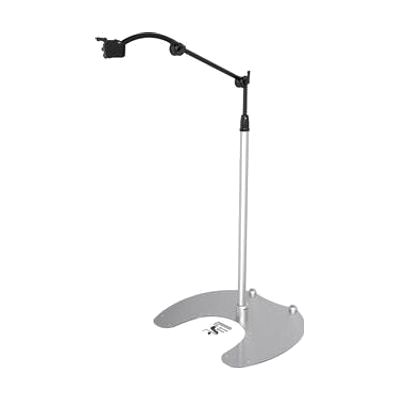
REHAdapt Floor Stand FS Mini
Est. $200–$450
The FS Mini is a small floor stand that holds a lightweight device, such as a communication aid or an eye gaze system like eyetuitive for iPadOS, in reach of someone at a bedside, a sofa, or a wheelchair. It has a flat base, lightweight tubes with QuickShift handles for repositioning, and a quick release system that lets you attach and remove the device fast. It can roll when tilted, so moving it around a room is manageable. It holds up to 2 kg, so heavier tablets and devices won't be safe on it. The mounting plate is sold separately, and you'll need it before anything can be attached.
Verified 4 days agoSetup with instructions -

simPODD
Est. $30–$100
simPODD is an iOS app for using PODD communication books, a paper-based way of communicating that some people use with a communication partner. It aims to make communicating feel more natural and to speed up printing the pages. It comes from the team that makes Proloquo2Go.
Verified 4 days agoProfessional guidance helps -

Button Click Switch
$34.95
The Button Click Switch is a small plate switch, about 2½ inches square, that sends a signal each time it is pressed. It needs only about 40 grams of pressure, so a light touch is enough to activate it. It has no battery. This is just the switch, so it does nothing until you connect it to something that accepts a switch, such as a switch-adapted toy, a call chime, or a switch interface.
Not recently verifiedProfessional guidance helps