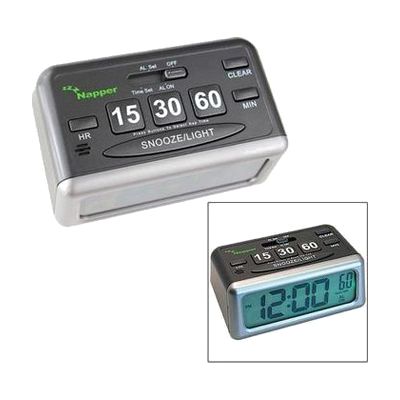
Napper Low Vision Alarm Clock with Nap Timer Buttons
by Napper
Price is what the vendor listed when last checked. Confirm it with the vendor before buying.
What it is
Summary
AI-generated from vendor-published content · October 1, 2026
The Napper is a battery-powered alarm clock with three one-touch nap buttons for 15, 30, and 60 minutes. Press one to start a nap timer right away. Press more than one to add the times together, so 30 plus 15 gives a 45-minute nap, and the timer can run as long as 8 hours. The display uses big, bold black numbers of nearly half an inch on an LCD, which makes the time easy to read at a glance if you have low vision. It also has a regular morning wake-up alarm with snooze that works separately from the nap timer, so you can nap without changing your wake-up time. The alarm sounds as an intermittent beep, and the clock can also serve as a simple kitchen or task timer.
Getting it
Try before you buy
Devices like this are often available to borrow through your state's AT Act program — typically free or low-cost — so you can try it before buying or pursuing funding.
Where to get it
This is the vendor WhatCanHelp tracks for this product — it may also be available from other retailers or a local supplier, and prices vary.
Wondering how equipment like this gets paid for? See the official funding programs in your state.
Details
Quick Facts Catalog facts · auto-generated
- Type
- Addresses
- Platform
- Age range
- Complexity
- Ready to use
- Price
- $14.95
- Funding
- AT Act lending
- Out of pocket
What setup looks like
- Out of the box
- Put batteries in the clock and set the time and your morning wake-up alarm.
- Press the 15, 30, or 60 button to start a nap timer. Press the CLEAR button if you make a mistake and want to start over.
Compare & explore
Sources & fine print
Vendor facts (name, price, platforms, vendor link) sourced from MaxiAids — view on vendor site (opens in a new tab); last checked November 2, 2026.
Classification & description AI-generated from vendor-published content on October 1, 2026 · confidence: high. Vendor specs may lag; verify before relying on details in a clinical or funding artifact.