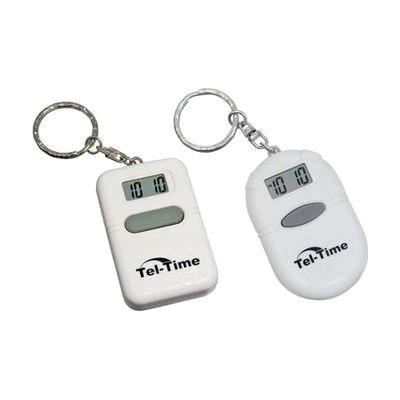
Talking Key Chain 2 Pack (Square and Oval White)
by Tel-Time
Price is what the vendor listed when last checked. Confirm it with the vendor before buying.
What it is
Summary
AI-generated from vendor-published content · October 1, 2026
This two-pack gives you a square and an oval white keychain clock that speak the time in a female voice, so you can check it without looking at a screen. Each one also shows the time in 1/4 inch black numbers on an LCD display, for anyone who prefers to read it. You can set an alarm, and each clock can announce the time every hour. Two LR44 batteries are included in each clock. They arrive in a power saving mode, so you'll need to hold the Talking button for 3 seconds before the clock will work.
Getting it
Try before you buy
Devices like this are often available to borrow through your state's AT Act program — typically free or low-cost — so you can try it before buying or pursuing funding.
Where to get it
This is the vendor WhatCanHelp tracks for this product — it may also be available from other retailers or a local supplier, and prices vary.
Wondering how equipment like this gets paid for? See the official funding programs in your state.
Details
Quick Facts Catalog facts · auto-generated
- Type
- Addresses
- Platform
- Age range
- Complexity
- Ready to use
- Price
- $20.80
- Funding
- AT Act lending
- Out of pocket
What setup looks like
- Out of the box
- Batteries are already included. Press and hold the Talking button for 3 seconds to take the clock out of power saving mode.
- Press the Talking button to hear the time, or read the large numbers on the LCD.
- If you won't use a clock for a while, hold the Mode and Talking buttons together for 3 seconds to turn power saving mode back on.
Compare & explore
Sources & fine print
Vendor facts (name, price, platforms, vendor link) sourced from MaxiAids — view on vendor site (opens in a new tab); last checked November 2, 2026.
Classification & description AI-generated from vendor-published content on October 1, 2026 · confidence: high. Vendor specs may lag; verify before relying on details in a clinical or funding artifact.