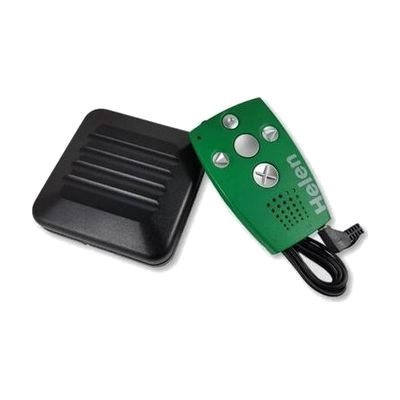
HELEN Vibrating Alarm Clock
by Bones
Price is what the vendor listed when last checked. Confirm it with the vendor before buying.
Last verified September 18, 2026 · classified April 26, 2026
What it is
Summary
AI-generated from vendor-published content · April 26, 2026
The HELEN is a credit-card-sized device that tells time and manages alarms through vibration patterns — no sight or hearing required. It's designed specifically for people who are deaf-blind, delivering tactile feedback for the current time, scheduled alarms, and reminders throughout the day, with an included external vibration cushion for bed-shaker-strength wake-up alerts. The device comes as a complete standalone unit with the cushion accessory included, and also has an optional speech output mode useful when communicating with a sighted/hearing caregiver or teacher. At $525 it's a specialized piece of hardware with a narrow but critical use case — be aware that configuring alarms and timers requires learning the tactile button layout, which may take time and practice to use independently, particularly for users with limited prior experience with deafblind assistive devices.
Quick Facts Catalog facts · auto-generated
- AT Act lending
- Medicaid waiver
- Out of pocket
- Vocational rehab
What Setup Looks Like
- Out of the box
Insert or charge the battery and carry the device — the tactile buttons can be felt and identified right away. - With a guide
- Read the included manual to learn the vibration pattern codes for time-of-day and alarm signals.
- Configure alarms and daily reminders using the large tactile buttons — allow 30–60 minutes to practice the button sequences confidently.
- Connect the external vibration cushion to the device for overnight wake-up alerts.
- See manufacturer support resources for detailed instructions.
- With professional help
- An orientation and mobility (O&M) specialist or deafblind intervenor can introduce the device and teach the vibration code system, particularly for users new to tactile-based time-telling.
- Expect 1–3 sessions to achieve confident independent use.
Getting it
Try Before You Buy
Devices like this are often available to borrow through your state's AT Act program — typically free or low-cost — so you can try it before buying or pursuing funding.
Where to Get It
This is the vendor WhatCanHelp tracks for this product — it may also be available from other retailers or a local supplier, and prices vary.
Some links may be affiliate links — WhatCanHelp may earn a small commission from purchases at no extra cost to you. More on affiliates →
As an Amazon Associate we earn from qualifying purchases.
How to Fund This
Equipment like this is often pursued through official state programs. These are common starting points — each program decides its own eligibility and what it covers, so the first step is always a phone call.
Compare & explore
Sources & fine print
Vendor facts (name, price, platforms, vendor link) sourced from Bones — view on vendor site; last verified September 18, 2026.
Classification & description AI-generated from vendor-published content on April 26, 2026 · confidence: high. Vendor specs may lag; verify before relying on details in a clinical or funding artifact.