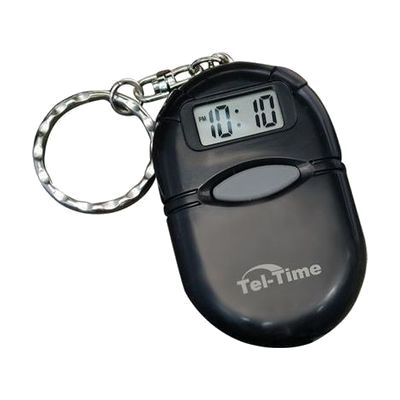
Oval Talking Keychain
by MaxiAids
Price is what the vendor listed when last checked. Confirm it with the vendor before buying.
What it is
Summary
AI-generated from vendor-published content · October 1, 2026
This keychain clock speaks the time aloud in a female voice at the press of a button, and it also shows the time on an LCD screen with 1/4-inch black numbers. It can sound an alarm and announce the time every hour. That makes it handy for someone who wants to check the time without reading a watch face or phone screen. It ships with a power saving mode switched on, so you'll need to turn that off before it will work the first time.
Getting it
Try before you buy
Devices like this are often available to borrow through your state's AT Act program — typically free or low-cost — so you can try it before buying or pursuing funding.
Where to get it
This is the vendor WhatCanHelp tracks for this product — it may also be available from other retailers or a local supplier, and prices vary.
Wondering how equipment like this gets paid for? See the official funding programs in your state.
Details
Quick Facts Catalog facts · auto-generated
- Type
- Addresses
- Platform
- Age range
- Complexity
- Ready to use
- Price
- $11.95
- Funding
- AT Act lending
- Out of pocket
What setup looks like
- Out of the box
- The two LR44 batteries are included. The clock arrives in power saving mode, so press and hold the Talking button for 3 seconds to wake it up.
- Press the Talking button any time to hear the time spoken and see it on the display.
- To save battery when you won't be using it for a while, press and hold the Mode and Talking buttons together for 3 seconds to turn power saving mode back on.
Compare & explore
More low vision aids
-
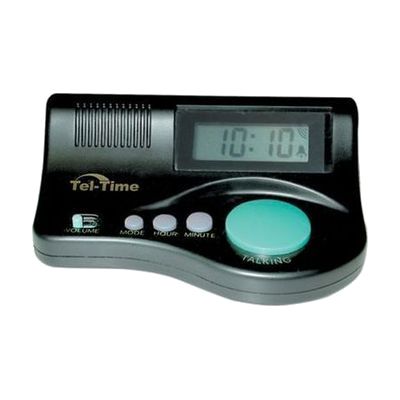
Curve Talking Clock
$12.95 – $14.95
-
-
-
-
-

Sources & fine print
Vendor facts (name, price, platforms, vendor link) sourced from MaxiAids — view on vendor site (opens in a new tab); last checked November 20, 2026.
Classification & description AI-generated from vendor-published content on October 1, 2026 · confidence: high. Vendor specs may lag; verify before relying on details in a clinical or funding artifact.