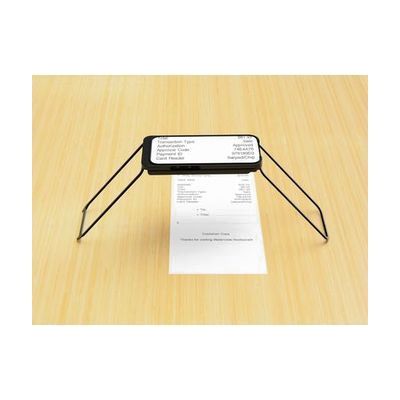
Case for Vision iPhone Based Magnifier
by Luxo
Last verified June 19, 2026 · classified April 26, 2026
What it is
Summary
AI-generated from vendor-published content · April 26, 2026
The Case for Vision is a folding stand that holds your own iPhone 15 Pro at a fixed distance above a surface, turning it into a hands-free electronic magnifier for reading and close-up tasks. It's designed for someone with low vision who wants a portable magnification solution without carrying a dedicated CCTV device — think reading mail, signing documents, or doing crafts. The case includes a flip mirror for distance viewing, and a companion app handles magnification level, contrast modes, and panning. This is not a self-contained magnifier: you must own a compatible iPhone, download the free app yourself, and understand that the quality of the magnification depends on your phone's camera. At $299, you're paying for the stand and optical hardware, not the processing power — which is a smart tradeoff if you already have the phone, but the solution only works with the iPhone 15 Pro for now.
Quick Facts Catalog facts · auto-generated
- AT Act lending
- Medicaid waiver
- Out of pocket
- School district
- Vocational rehab
What Setup Looks Like
- Out of the box
Insert your iPhone 15 Pro into the case and unfold the legs to create a stable stand. - With a guide
- Download the free Case for Vision app from the App Store.
- Use the app controls to set your preferred magnification level, color contrast filter, and panning behavior.
- Flip the included optical mirror to enable distance magnification mode.
- Allow 15–30 minutes to explore app settings and find your preferred configuration. See manufacturer support resources for detailed instructions.
- With professional help
- A low vision specialist or occupational therapist can assess whether this magnification range and form factor meet your functional reading needs.
- They can also compare this solution against dedicated CCTVs and other electronic magnifiers — expect a 1-hour low vision evaluation.
Getting it
Try Before You Buy
Devices like this are often available to borrow through your state's AT Act program — typically free or low-cost — so you can try it before buying or pursuing funding.
Where to Get It
Some links may be affiliate links — WhatCanHelp may earn a small commission from purchases at no extra cost to you. More on affiliates →
As an Amazon Associate we earn from qualifying purchases.
How to Fund This
Equipment like this is often pursued through official state programs. These are common starting points — each program decides its own eligibility and what it covers, so the first step is always a phone call.
Compare & explore
Sources & fine print
Vendor facts (name, price, platforms, vendor link) sourced from Luxo — view on vendor site; last verified June 19, 2026.
Classification & description AI-generated from vendor-published content on April 26, 2026 · confidence: high. Vendor specs may lag; verify before relying on details in a clinical or funding artifact.