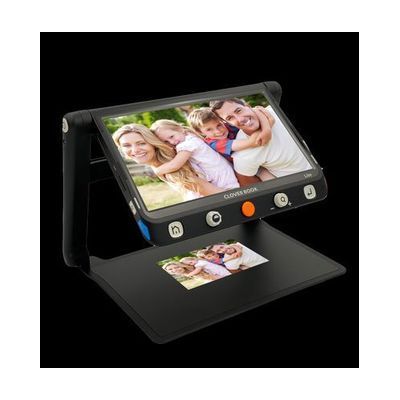
Cloverbook LITE 12.5"
by LS&S
Last verified June 18, 2026 · classified April 26, 2026
What it is
Summary
AI-generated from vendor-published content · April 26, 2026
The CloverBook Lite is a 12.5-inch portable video magnifier with a built-in folding stand, letting someone with low vision place it on a table and read documents, mail, or handwriting hands-free — no separate stand or desk mount needed. It's best suited for someone who needs a full-featured desktop-style magnifier but also travels or moves between rooms, since it folds flat and includes a carry case with shoulder strap. You get the complete package here: the magnifier, stand, carrying case, and rechargeable battery are all included, with no additional hardware required to use it. It weighs 5.3 pounds, which is meaningful for anyone with limited arm strength or fatigue, and battery life of 4–5 hours means all-day portable use will require planning around charging.
Quick Facts Catalog facts · auto-generated
- AT Act lending
- Medicaid waiver
- Out of pocket
- Vocational rehab
What Setup Looks Like
- Out of the box
- Unfold the integrated stand and place on a flat surface — the device stands freely.
- Power on and position document or object under the camera to begin magnifying.
- Use touchscreen or tactile buttons to adjust magnification (1x–60x) and contrast mode.
- With a guide
- Review the included user manual to configure preferred contrast modes and save default settings.
- Set up external monitor or TV connection if split-screen or larger viewing is needed — requires an HDMI cable (verify compatibility).
- Allow approximately 30–60 minutes to explore the 16 contrast modes and find the best setting for your typical reading tasks. See manufacturer support resources for detailed instructions.
- With professional help
- A low vision specialist or orientation and mobility (O&M) specialist can assess whether a 12.5-inch portable magnifier meets your functional vision needs versus a larger desktop CCTV.
- An ATP or low vision therapist can help configure optimal contrast, magnification defaults, and line/mask settings for your specific vision condition — typically a single 1-hour appointment.
Getting it
Try Before You Buy
Devices like this are often available to borrow through your state's AT Act program — typically free or low-cost — so you can try it before buying or pursuing funding.
Where to Get It
Some links may be affiliate links — WhatCanHelp may earn a small commission from purchases at no extra cost to you. More on affiliates →
As an Amazon Associate we earn from qualifying purchases.
How to Fund This
Equipment like this is often pursued through official state programs. These are common starting points — each program decides its own eligibility and what it covers, so the first step is always a phone call.
Compare & explore
Sources & fine print
Vendor facts (name, price, platforms, vendor link) sourced from LS&S — view on vendor site; last verified June 18, 2026.
Classification & description AI-generated from vendor-published content on April 26, 2026 · confidence: high. Vendor specs may lag; verify before relying on details in a clinical or funding artifact.