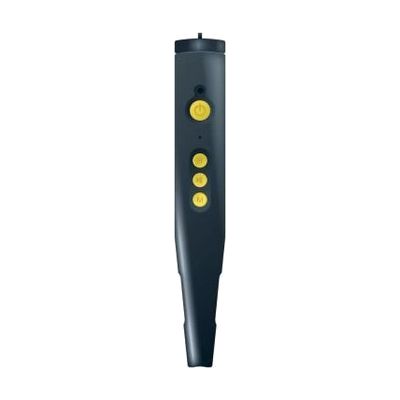
PenFriend III Voice Labeling System
by LS&S
Last verified June 18, 2026 · classified April 26, 2026
What it is
Summary
AI-generated from vendor-published content · April 26, 2026
The PenFriend III is a pen-shaped wand that records your voice onto small adhesive stickers — touch the pen to any labeled sticker and it plays back whatever you recorded. It's designed for people with vision loss who need a reliable way to tell similar-looking items apart: medicine bottles, food cans, file folders, calendar appointments, or any object that would otherwise require reading printed text. The kit comes ready to use with 105 tactile labels (the raised texture helps locate them by touch) and 16GB of internal storage, with an SD card slot if you need more. The label stickers are proprietary to this system — you'll need to reorder them separately when you run out, and replacement label costs should factor into your long-term budget.
Quick Facts Catalog facts · auto-generated
- AT Act lending
- Out of pocket
- Vocational rehab
What Setup Looks Like
- Out of the box
- Insert batteries (or charge via USB — confirm your model).
- Peel a tactile label and affix it to any object.
- Hold the pen tip to the label and press Record to capture your voice message.
- Touch the pen to the same label at any time to play back your recording — works immediately.
- With a guide
- Download the free Label Manager software from penfriendlabeller.com/penfriend-manager on a Windows PC to back up and organize your recordings.
- Choose either the Audio Interface (JAWS-compatible, screen-reader accessible) or the Graphic Interface (requires sighted assistance) for managing labels via computer — allow 20–30 minutes to set up. See manufacturer support resources for detailed instructions.
Getting it
Try Before You Buy
Devices like this are often available to borrow through your state's AT Act program — typically free or low-cost — so you can try it before buying or pursuing funding.
Where to Get It
Some links may be affiliate links — WhatCanHelp may earn a small commission from purchases at no extra cost to you. More on affiliates →
As an Amazon Associate we earn from qualifying purchases.
How to Fund This
Equipment like this is often pursued through official state programs. These are common starting points — each program decides its own eligibility and what it covers, so the first step is always a phone call.
Compare & explore
Sources & fine print
Vendor facts (name, price, platforms, vendor link) sourced from LS&S — view on vendor site; last verified June 18, 2026.
Classification & description AI-generated from vendor-published content on April 26, 2026 · confidence: high. Vendor specs may lag; verify before relying on details in a clinical or funding artifact.