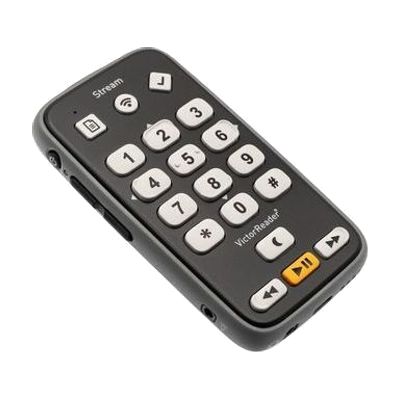
Victor Reader Stream - 3rd Generation
by HumanWare
$499.00 ▲ $6.24 (1%)
Last verified July 26, 2026 · classified April 26, 2026
What it is
Summary
AI-generated from vendor-published content · April 26, 2026
The Victor Reader Stream 3rd Generation is a pocket-sized, fully tactile audio player designed specifically for people who are blind or have low vision — it plays DAISY talking books, MP3s, podcasts, internet radio, and connects directly to libraries like NLS BARD and Bookshare without needing a separate computer or sighted assistance. Every control is raised and textured so the device can be operated entirely by touch, and built-in self-voicing announces button functions, playback position, and book information. This is a complete, standalone solution: it includes 16GB of internal storage, a built-in speaker, Bluetooth, and USB-C charging, so there's no additional hardware required to start listening. Accessing online libraries like BARD requires account registration in advance, which may need sighted or support assistance to complete the first time.
Quick Facts Catalog facts · auto-generated
- AT Act lending
- Medicaid waiver
- Out of pocket
- Vocational rehab
What Setup Looks Like
- Out of the box
- Power on the device — the self-voicing interface will announce button functions and guide you through basic use.
- Insert a pre-loaded SD card or use internal storage to play downloaded DAISY books or audio files right away.
- With a guide
- Connect to Wi-Fi using the device's wireless setup menu.
- Register for and link NLS BARD, Bookshare, or NFB Newsline accounts through the device's library portals.
- Configure Bluetooth pairing for headphones or speakers if desired — allow 30–60 minutes total for full setup. See manufacturer support resources for detailed instructions.
Getting it
Try Before You Buy
Devices like this are often available to borrow through your state's AT Act program — typically free or low-cost — so you can try it before buying or pursuing funding.
Where to Get It
This is the vendor WhatCanHelp tracks for this product — it may also be available from other retailers or a local supplier, and prices vary.
Some links may be affiliate links — WhatCanHelp may earn a small commission from purchases at no extra cost to you. More on affiliates →
As an Amazon Associate we earn from qualifying purchases.
How to Fund This
Equipment like this is often pursued through official state programs. These are common starting points — each program decides its own eligibility and what it covers, so the first step is always a phone call.
Compare & explore
Sources & fine print
Vendor facts (name, price, platforms, vendor link) sourced from HumanWare — view on vendor site; last verified July 26, 2026.
Classification & description AI-generated from vendor-published content on April 26, 2026 · confidence: high. Vendor specs may lag; verify before relying on details in a clinical or funding artifact.