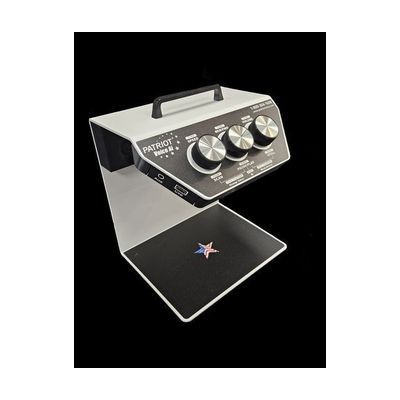
Patriot Voice AI Reader / Scanner
by LS&S
Last verified June 18, 2026 · classified April 26, 2026
What it is
Summary
AI-generated from vendor-published content · April 26, 2026
The Patriot Voice AI Reader is a standalone desktop scanning and reading device that photographs printed documents, converts the text using OCR, and reads it aloud through built-in speakers. It's designed for someone with low vision or blindness who wants to independently access printed mail, books, newspapers, or handwritten notes without relying on another person or a computer. The device comes ready to use on its own — place a document on the base, press the camera button, and it reads. With an internet connection, it adds AI-powered features like barcode scanning, handwriting recognition, photo description, language translation, and bill/receipt recognition, making it a notably capable all-in-one tool. At nearly $3,500, this is a significant investment, and prospective buyers should compare it against similarly priced video magnifiers or software-based OCR solutions to ensure the standalone simplicity justifies the cost.
Quick Facts Catalog facts · auto-generated
- AT Act lending
- Medicaid waiver
- Out of pocket
- Vocational rehab
What Setup Looks Like
- Out of the box
- Place a printed document on the base in any orientation.
- Press the camera button — the device photographs and reads the document aloud.
- Use the large rotary buttons to pause, resume, or navigate through the text.
- With a guide
- Connect the device to your home Wi-Fi network to enable AI features (barcode reading, photo descriptions, handwriting recognition, translation).
- Review the user manual to configure preferred language (English or Spanish), voice selection, and reading speed — allow 20–30 minutes.
- See manufacturer support resources for detailed instructions.
Getting it
Try Before You Buy
Devices like this are often available to borrow through your state's AT Act program — typically free or low-cost — so you can try it before buying or pursuing funding.
Where to Get It
Some links may be affiliate links — WhatCanHelp may earn a small commission from purchases at no extra cost to you. More on affiliates →
As an Amazon Associate we earn from qualifying purchases.
How to Fund This
Equipment like this is often pursued through official state programs. These are common starting points — each program decides its own eligibility and what it covers, so the first step is always a phone call.
Compare & explore
Sources & fine print
Vendor facts (name, price, platforms, vendor link) sourced from LS&S — view on vendor site; last verified June 18, 2026.
Classification & description AI-generated from vendor-published content on April 26, 2026 · confidence: high. Vendor specs may lag; verify before relying on details in a clinical or funding artifact.