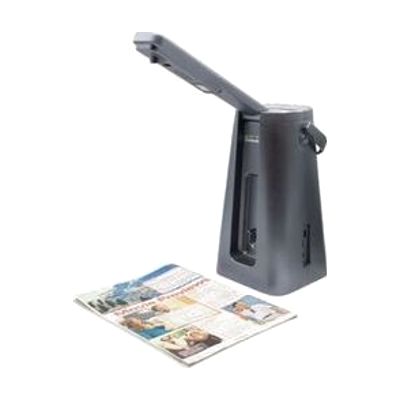
Odyssey Text to Speech Reader
by HumanWare
Price is what the vendor listed when last checked. Confirm it with the vendor before buying.
Last verified September 20, 2026 · classified April 26, 2026
What it is
Summary
AI-generated from vendor-published content · April 26, 2026
The Odyssey is a portable scanning and reading device that uses a camera arm to capture printed text and read it aloud in natural-sounding speech. It's designed for someone who is blind or has low vision and wants independent access to printed materials — mail, food packaging, books, and documents — without needing a smartphone, computer, or sighted helper. The device is entirely self-contained: place the page under the arm, press a button, and it reads aloud through its speaker or Bluetooth headphones, with adjustable speed, voice, and language. At $1,950 it's a significant investment, and while the basic operation is straightforward, getting the most from features like language settings, scan storage, and simple mode benefits from an initial orientation session with a vision rehabilitation specialist.
Quick Facts Catalog facts · auto-generated
- AT Act lending
- Medicaid waiver
- Out of pocket
- Vocational rehab
What Setup Looks Like
- Out of the box
- Unfold the scanner arm, place printed material on the base, and press the scan button — the device reads aloud within seconds.
- Adjust volume, reading speed, and voice using the large tactile buttons on top of the unit.
- With a guide
- Charge the device fully before first use (approximately 4 hours).
- Pair Bluetooth headphones using the device's Bluetooth controls — refer to the quick-start guide for pairing steps.
- Configure preferred language and simple mode if needed — estimated 20–30 minutes with documentation. See manufacturer support resources for detailed instructions.
- With professional help
- A vision rehabilitation therapist (VRT) or orientation and mobility specialist can assess whether the Odyssey fits the user's reading habits and functional vision level.
- A specialist can also configure simple mode for users with cognitive or motor limitations, and train on efficient scanning technique — typically one 60-minute session.
Getting it
Try Before You Buy
Devices like this are often available to borrow through your state's AT Act program — typically free or low-cost — so you can try it before buying or pursuing funding.
Where to Get It
These are the vendors WhatCanHelp tracks for this product — it may also be available from other retailers or a local supplier, and prices vary.
Some links may be affiliate links — WhatCanHelp may earn a small commission from purchases at no extra cost to you. More on affiliates →
As an Amazon Associate we earn from qualifying purchases.
How to Fund This
Equipment like this is often pursued through official state programs. These are common starting points — each program decides its own eligibility and what it covers, so the first step is always a phone call.
Compare & explore
Sources & fine print
Vendor facts (name, price, platforms, vendor link) sourced from HumanWare — view on vendor site; last verified September 20, 2026.
Classification & description AI-generated from vendor-published content on April 26, 2026 · confidence: high. Vendor specs may lag; verify before relying on details in a clinical or funding artifact.