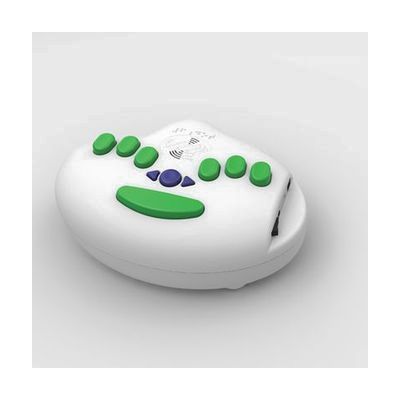
6Dot Electronic Braille Label Maker and Accessories
by LS&S
Price is what the vendor listed when last checked. Confirm it with the vendor before buying.
Last verified September 19, 2026 · classified April 26, 2026
What it is
Summary
AI-generated from vendor-published content · April 26, 2026
The 6Dot Electronic Braille Label Maker is a standalone device that embosses Braille text onto self-adhesive vinyl tape, then automatically scores and cuts the finished label — no scissors or significant hand strength required. It's designed for blind individuals, teachers of the visually impaired, Braillists, and institutional settings (schools, offices, residential complexes) that need to create Braille labels for organizing spaces and making environments accessible. The device includes a built-in six-key Braille keyboard for direct entry, plus a mini-USB port that accepts a standard QWERTY keyboard, allowing a sighted person to type while the machine outputs Braille. One important consideration: at $1,345, this is a significant investment, and the tape it uses is a proprietary 3/8" vinyl stock, so ongoing supply costs and availability are worth confirming before purchase.
Quick Facts Catalog facts · auto-generated
- AT Act lending
- Out of pocket
- School district
- Vocational rehab
What Setup Looks Like
- Out of the box
Insert tape cartridge and power on the device — the built-in Braille keyboard is ready to use for label entry immediately. - With a guide
- Connect the included QWERTY keyboard via the mini-USB adapter to enable sighted-person text entry.
- Review the user manual to learn grade levels of Braille input and how to switch between entry modes.
- Practice a few test labels to become comfortable with the automatic cut and score functions — allow 30–60 minutes for initial familiarization. See manufacturer support resources for detailed instructions.
- With professional help
A Teacher of the Visually Impaired (TVI) or orientation and mobility specialist can help a blind user learn the six-key Braille keyboard entry method and develop an organizational labeling system for home or classroom.
Getting it
Try Before You Buy
Devices like this are often available to borrow through your state's AT Act program — typically free or low-cost — so you can try it before buying or pursuing funding.
Where to Get It
This is the vendor WhatCanHelp tracks for this product — it may also be available from other retailers or a local supplier, and prices vary.
Some links may be affiliate links — WhatCanHelp may earn a small commission from purchases at no extra cost to you. More on affiliates →
As an Amazon Associate we earn from qualifying purchases.
How to Fund This
Equipment like this is often pursued through official state programs. These are common starting points — each program decides its own eligibility and what it covers, so the first step is always a phone call.
Compare & explore
Sources & fine print
Vendor facts (name, price, platforms, vendor link) sourced from LS&S — view on vendor site; last verified September 19, 2026.
Classification & description AI-generated from vendor-published content on April 26, 2026 · confidence: high. Vendor specs may lag; verify before relying on details in a clinical or funding artifact.