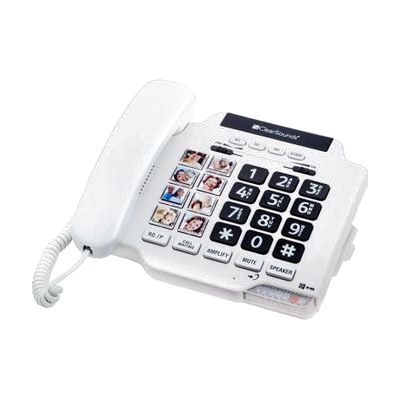
ClearSounds Photo5000 Amplified Photo
by Clarity
Price is what the vendor listed when last checked. Confirm it with the vendor before buying.
What it is
Summary
AI-generated from vendor-published content · October 1, 2026
This corded, single-line desk phone makes calls easier to hear and easier to place. It amplifies incoming sound up to 40dB, with tone control to shape how voices sound, and the base has a full-duplex speakerphone (both sides can talk at once). Eight photo-frame buttons let someone dial a family member by tapping their picture, so there's no need to remember a number or even a name. The keypad has large, easy-to-read buttons, and the ringer is adjustable and has a bright visual signal for people who miss the sound. It's hearing aid compatible and can sit on a table or mount on a wall. It plugs into a standard phone line, so it's a good fit for someone with moderate hearing and/or vision loss, or someone who finds numbers hard to recall.
Getting it
Try before you buy
Devices like this are often available to borrow through your state's AT Act program — typically free or low-cost — so you can try it before buying or pursuing funding.
Where to get it
This is the vendor WhatCanHelp tracks for this product — it may also be available from other retailers or a local supplier, and prices vary.
How to fund this
These are common places to ask about paying for equipment like this. Each one decides its own eligibility and what it covers, so start by asking them.
Details
Quick Facts Catalog facts · auto-generated
- Platform
- Complexity
- Setup with instructions
- Price
- $89.95
- Funding
- AT Act lending
- Medicaid waiver
- Out of pocket
What setup looks like
- With a guide
- Plug the phone into your phone line and power it, then set it on a table or mount it on the wall using the included table/wall design.
- Load a photo into each of the eight photo-frame buttons and program the matching phone number, following the user manual.
- Set the amplification, tone control, and ringer volume to suit the person using it. Plan about 30 minutes in total.
Compare & explore
Sources & fine print
Vendor facts (name, price, platforms, vendor link) sourced from LS&S — view on vendor site (opens in a new tab); last checked November 3, 2026.
Classification & description AI-generated from vendor-published content on October 1, 2026 · confidence: high. Vendor specs may lag; verify before relying on details in a clinical or funding artifact.