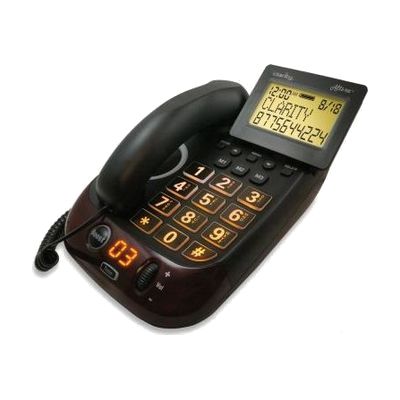
Clarity Alto Plus 53dB Corded Phone w/ Talking and Visual Caller ID
by Clarity
Price is what the vendor listed when last checked. Confirm it with the vendor before buying.
What it is
Summary
AI-generated from vendor-published content · October 1, 2026
This corded phone makes incoming calls up to 53dB louder and speaks each key you press and the name or number of each caller. A large 4-inch tilting screen with big, backlit text shows who is calling, so it works for people who have trouble hearing and trouble seeing small displays. It also has a 100dB ringer with a visual indicator, a speakerphone, three one-touch memory buttons, and a boost override that turns amplification on for everyone who uses it. Outgoing speech amplification makes your voice louder for the person you're talking to, and jacks for a headset and neckloop let you connect other listening gear. It plugs into a phone line, and the battery backup and optional bed shaker are sold separately.
Getting it
Try before you buy
Devices like this are often available to borrow through your state's AT Act program — typically free or low-cost — so you can try it before buying or pursuing funding.
Where to get it
This is the vendor WhatCanHelp tracks for this product — it may also be available from other retailers or a local supplier, and prices vary.
How to fund this
These are common places to ask about paying for equipment like this. Each one decides its own eligibility and what it covers, so start by asking them.
Details
Quick Facts Catalog facts · auto-generated
- Addresses
- Platform
- Complexity
- Setup with instructions
- Price
- $229.95
- Funding
- AT Act lending
- Medicaid waiver
- Out of pocket
What setup looks like
- Out of the box
Plug in the phone line and power, and you can make and answer calls with the amplification and speakerphone. - With a guide
- Adjust the tone and volume controls and the screen angle while someone who has trouble hearing or seeing tries the phone.
- Store frequent numbers on the three one-touch memory buttons, and turn on the boost override if others share the phone.
- Plan about 30 minutes to try the talking keypad and caller ID, plus any headset, neckloop or bed shaker.
Compare & explore
Sources & fine print
Vendor facts (name, price, platforms, vendor link) sourced from LS&S — view on vendor site (opens in a new tab); last checked November 3, 2026.
Classification & description AI-generated from vendor-published content on October 1, 2026 · confidence: high. Vendor specs may lag; verify before relying on details in a clinical or funding artifact.