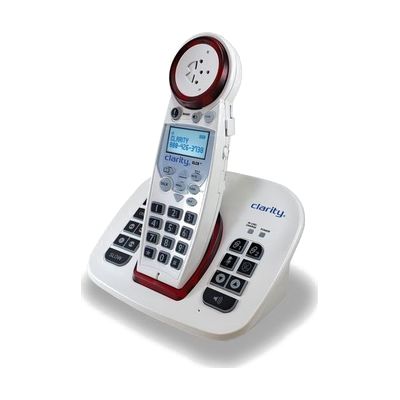
Clarity XLC8 Extra Loud Cordless Phone with Bluetooth
by Clarity
Last verified June 18, 2026 · classified April 26, 2026
What it is
Summary
AI-generated from vendor-published content · April 26, 2026
The Clarity XLC8 is an amplified cordless phone that boosts incoming call volume up to 50dB — well above the 18dB maximum of standard phones — making it usable for people with moderate to severe hearing loss who struggle with conventional handsets. It pairs via Bluetooth with up to two smartphones, so mobile calls can be routed through the amplified handset without needing a traditional landline. The package includes large illuminated talking buttons, a high-contrast caller ID screen with large font, talking caller ID, and an answering machine that can slow down message playback for easier comprehension. Bluetooth pairing with smartphones requires some setup, and users who also rely on hearing aids should check that their specific hearing aid model is compatible with the phone's audio output before buying.
Quick Facts Catalog facts · auto-generated
- AT Act lending
- Medicaid waiver
- Out of pocket
What Setup Looks Like
- Out of the box
Insert batteries into handset, place base on a flat surface, and plug the base into a power outlet — the phone works for landline calls right away. - With a guide
- Follow the included guide to pair up to two Bluetooth devices (smartphones) through the phone's menu system.
- Set preferred ringer tone, volume wheel level, and tone control setting to match your hearing needs.
- Download contacts from your smartphone to the XLC8 via the Bluetooth contact-transfer feature — expect 20-30 minutes total for full setup. See manufacturer support resources for detailed instructions.
Getting it
Try Before You Buy
Devices like this are often available to borrow through your state's AT Act program — typically free or low-cost — so you can try it before buying or pursuing funding.
Where to Get It
Some links may be affiliate links — WhatCanHelp may earn a small commission from purchases at no extra cost to you. More on affiliates →
As an Amazon Associate we earn from qualifying purchases.
How to Fund This
Equipment like this is often pursued through official state programs. These are common starting points — each program decides its own eligibility and what it covers, so the first step is always a phone call.
Compare & explore
Sources & fine print
Vendor facts (name, price, platforms, vendor link) sourced from Clarity — view on vendor site; last verified June 18, 2026.
Classification & description AI-generated from vendor-published content on April 26, 2026 · confidence: high. Vendor specs may lag; verify before relying on details in a clinical or funding artifact.