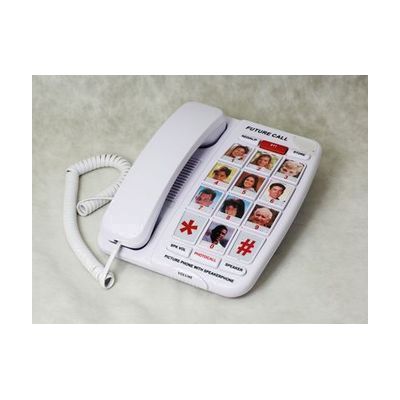
One Touch Photo Speakerphone with 40dB
by LS&S
Last verified June 18, 2026 · classified May 9, 2026
What it is
Summary
AI-generated from vendor-published content · May 9, 2026
This landline speakerphone is built for people who struggle with standard phone dialing — particularly those with dementia, significant cognitive impairment, or limited fine motor control. The 10 one-touch buttons can be loaded with photos instead of numbers, so a person dials by pressing a picture of a family member rather than remembering and entering digits. A lockout toggle forces photo-only dialing, preventing accidental or confused calls to unintended numbers. The 40dB amplification level is substantial — suitable for moderate-to-severe hearing loss — and the speakerphone with four volume steps means the handset doesn't need to be held. No batteries or AC adapter required, just a phone line connection, and memory is retained through power outages. The photo buttons are 1" x 1.5", which is workable but small — families should consider whether the person will actually be able to identify images at that size.
Quick Facts Catalog facts · auto-generated
- AT Act lending
- Medicaid waiver
- Out of pocket
What Setup Looks Like
- Out of the box
Plug into a phone jack — the phone works for basic calling immediately with no power adapter needed. - With a guide
- Print or cut photos to the 1" x 1.5" size and insert them into the labeled button slots.
- Program each photo button with the corresponding phone number following the instruction sheet.
- If needed, set the toggle switch to photo-only mode to restrict dialing.
- Allow 20-30 minutes total for photo prep and number programming. See manufacturer instructions (PDF available on product page) for detailed steps.
Getting it
Try Before You Buy
Devices like this are often available to borrow through your state's AT Act program — typically free or low-cost — so you can try it before buying or pursuing funding.
Where to Get It
Some links may be affiliate links — WhatCanHelp may earn a small commission from purchases at no extra cost to you. More on affiliates →
How to Fund This
Equipment like this is often pursued through official state programs. These are common starting points — each program decides its own eligibility and what it covers, so the first step is always a phone call.
Compare & explore
Sources & fine print
Vendor facts (name, price, platforms, vendor link) sourced from LS&S — view on vendor site; last verified June 18, 2026.
Classification & description AI-generated from vendor-published content on May 9, 2026 · confidence: high. Vendor specs may lag; verify before relying on details in a clinical or funding artifact.