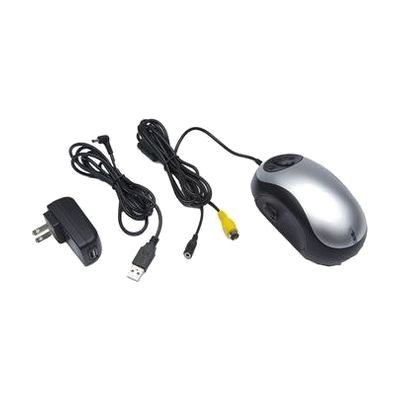
Miracle Mouse Wired Electronic TV Magnifier
Last verified June 19, 2026 · classified April 26, 2026
What it is
Summary
AI-generated from vendor-published content · April 26, 2026
This is a handheld video magnifier shaped like an oversized computer mouse that you roll across a page or document, displaying an enlarged image on your TV or computer monitor. It's designed for someone with low vision who wants an affordable way to read mail, labels, or printed materials without buying a dedicated desktop magnifier unit. You get the device itself plus a carry bag and power adapter, but you'll need to supply your own TV or monitor with a compatible input — it's not a standalone display. One honest tradeoff: image quality and stability at high magnification levels depend heavily on how steady you move the unit, so it takes a little practice to get smooth, readable results.
Quick Facts Catalog facts · auto-generated
- AT Act lending
- Out of pocket
- Vocational rehab
What Setup Looks Like
- Out of the box
Connect the device to your TV or monitor using the included cable, place it on printed material, and roll it across the page to see magnified text on screen. - With a guide
- Identify the correct input port on your TV or monitor (composite video or similar) and match it to the cable included.
- Switch your TV to the correct input source using its remote.
- Practice rolling the device slowly and steadily to find a comfortable magnification and color mode — allow 15–20 minutes to get comfortable with movement technique. See manufacturer support resources for detailed instructions.
Getting it
Try Before You Buy
Devices like this are often available to borrow through your state's AT Act program — typically free or low-cost — so you can try it before buying or pursuing funding.
Where to Get It
Some links may be affiliate links — WhatCanHelp may earn a small commission from purchases at no extra cost to you. More on affiliates →
As an Amazon Associate we earn from qualifying purchases.
How to Fund This
Equipment like this is often pursued through official state programs. These are common starting points — each program decides its own eligibility and what it covers, so the first step is always a phone call.
Compare & explore
Sources & fine print
Vendor facts (name, price, platforms, vendor link) sourced from Independent Living Aids — view on vendor site; last verified June 19, 2026.
Classification & description AI-generated from vendor-published content on April 26, 2026 · confidence: high. Vendor specs may lag; verify before relying on details in a clinical or funding artifact.