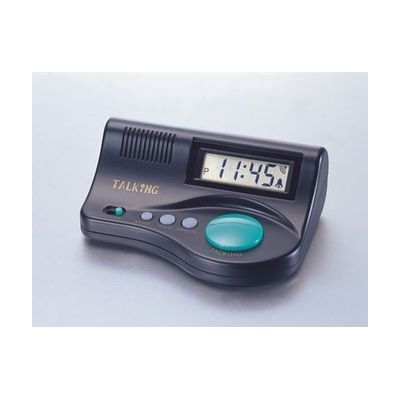
Talking Clock with EZ Talk Button
Last verified June 19, 2026 · classified April 26, 2026
What it is
Summary
AI-generated from vendor-published content · April 26, 2026
This compact desktop clock announces the current time aloud in a clear spoken voice when you press a large button on top, while also displaying digits on screen. It's designed for someone with low vision or blindness who can't easily read a standard clock face, or for anyone who simply finds it easier to hear the time than squint at a display. The clock is self-contained and battery-powered — no apps, no pairing, no setup beyond inserting two AA batteries. The alarm function only beeps rather than speaking the time, so it's less useful for someone who relies entirely on audio output.
Quick Facts Catalog facts · auto-generated
- AT Act lending
- Out of pocket
What Setup Looks Like
- Out of the box
- Insert 2 AA batteries (not included) into the battery compartment.
- Set the current time using the onboard controls.
- Press the large aqua button to hear the time spoken aloud — works immediately.
Getting it
Try Before You Buy
Devices like this are often available to borrow through your state's AT Act program — typically free or low-cost — so you can try it before buying or pursuing funding.
Where to Get It
Some links may be affiliate links — WhatCanHelp may earn a small commission from purchases at no extra cost to you. More on affiliates →
As an Amazon Associate we earn from qualifying purchases.
Wondering how equipment like this gets paid for? See the official funding programs in your state.
Compare & explore
Sources & fine print
Vendor facts (name, price, platforms, vendor link) sourced from Independent Living Aids — view on vendor site; last verified June 19, 2026.
Classification & description AI-generated from vendor-published content on April 26, 2026 · confidence: high. Vendor specs may lag; verify before relying on details in a clinical or funding artifact.