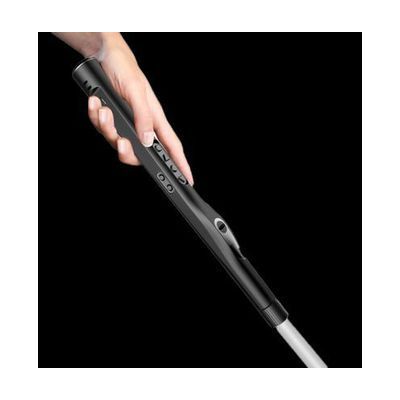
WeWALK Ultrasonic SmartCane V2 with AI
by WeWALK
$1,225.76 ▲ $375.76 (44%)
Price is what the vendor listed when last checked. Confirm it with the vendor before buying.
Last verified September 20, 2026 · classified April 26, 2026
What it is
Summary
AI-generated from vendor-published content · April 26, 2026
The WeWALK Smart Cane V2 is a white cane handle with built-in ultrasonic sensors that detect obstacles at upper-body height — things like tree branches, truck mirrors, and signs that a standard cane tip would miss — and alerts you through vibration in the handle. It pairs via Bluetooth with a free iOS or Android app that provides turn-by-turn navigation, public transit guidance, and points of interest, so your phone can stay in your pocket while you navigate using tactile buttons on the handle. This is a complete system: the handle attaches to an included Ambutech graphite white cane shaft, and the app works out of the box after pairing. One honest heads-up: the navigation and AI features depend on a working smartphone with a data connection, so functionality is reduced if your phone battery dies or you're in a low-signal area.
Quick Facts Catalog facts · auto-generated
- AT Act lending
- Medicaid waiver
- Out of pocket
- Vocational rehab
What Setup Looks Like
- Out of the box
- Attach the WeWALK handle to the included Ambutech white cane shaft.
- Power on the handle — ultrasonic obstacle detection and haptic alerts work immediately without the app.
- With a guide
- Download the free WeWALK app on iOS or Android.
- Pair the cane handle to your phone via Bluetooth through the app.
- Configure obstacle detection range (30–70 inches) and preferred navigation voice settings in the app preferences.
- Take a test walk using turn-by-turn navigation to calibrate comfort with haptic and audio feedback — allow 30–60 minutes to get comfortable. See manufacturer support resources for detailed instructions.
- With professional help
- An orientation and mobility specialist (O&M) can help calibrate detection range for your specific travel environment and train efficient use of the app navigation alongside cane technique.
- Expect 1–3 sessions with an O&M specialist to integrate the SmartCane into existing cane travel skills.
Getting it
Try Before You Buy
Devices like this are often available to borrow through your state's AT Act program — typically free or low-cost — so you can try it before buying or pursuing funding.
Where to Get It
This is the vendor WhatCanHelp tracks for this product — it may also be available from other retailers or a local supplier, and prices vary.
Some links may be affiliate links — WhatCanHelp may earn a small commission from purchases at no extra cost to you. More on affiliates →
As an Amazon Associate we earn from qualifying purchases.
How to Fund This
Equipment like this is often pursued through official state programs. These are common starting points — each program decides its own eligibility and what it covers, so the first step is always a phone call.
Compare & explore
Sources & fine print
Vendor facts (name, price, platforms, vendor link) sourced from WeWALK — view on vendor site; last verified September 20, 2026.
Classification & description AI-generated from vendor-published content on April 26, 2026 · confidence: high. Vendor specs may lag; verify before relying on details in a clinical or funding artifact.