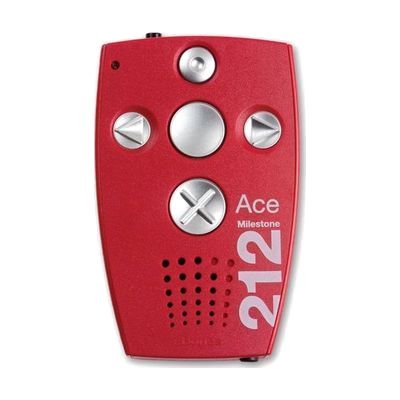
Milestone 212 Ace Book Reader
by Bones GmbH
Price is what the vendor listed when last checked. Confirm it with the vendor before buying.
What it is
Summary
AI-generated from vendor-published content · October 1, 2026
The Milestone 212 Ace is a palm-sized audio player that reads DAISY books aloud and also plays audio books from NLS and Audible.com plus MP3, WAV, WMA and iTunes AAC files. It has six tactile buttons, so you can find and press them by feel. It also records quick notes or lectures with its built-in microphone, and it has a speaker, a headphone jack, and a rechargeable battery rated for about 15 hours with headphones. Earbuds aren't included, so plan on bringing your own if you want private listening.
Getting it
Try before you buy
Devices like this are often available to borrow through your state's AT Act program — typically free or low-cost — so you can try it before buying or pursuing funding.
Where to get it
This is the vendor WhatCanHelp tracks for this product — it may also be available from other retailers or a local supplier, and prices vary.
How to fund this
These are common places to ask about paying for equipment like this. Each one decides its own eligibility and what it covers, so start by asking them.
Details
Quick Facts Catalog facts · auto-generated
- Type
- Addresses
- Platform
- Age range
- Complexity
- Ready to use
- Price
- $420.00
- Funding
- AT Act lending
- Out of pocket
- School district
- Vocational rehab
What setup looks like
- Out of the box
- Charge the player over USB for about 3 hours, then press the tactile buttons to play content.
- Use the speaker right away, or plug in your own headphones or earbuds for private listening.
- To add books or music, connect it to a PC or Mac over USB or load an SD card, then copy the files over.
Compare & explore
Sources & fine print
Vendor facts (name, price, platforms, vendor link) sourced from Independent Living Aids — view on vendor site (opens in a new tab); last checked November 4, 2026.
Classification & description AI-generated from vendor-published content on October 1, 2026 · confidence: high. Vendor specs may lag; verify before relying on details in a clinical or funding artifact.