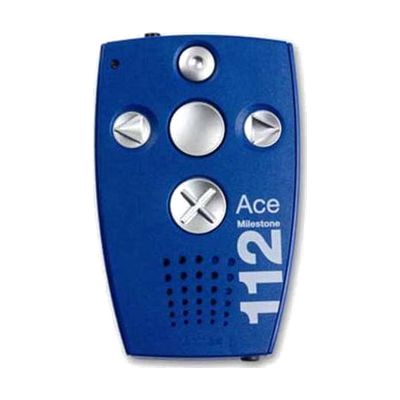
Milestone Ace 112 Digital Recorder
Price is what the vendor listed when last checked. Confirm it with the vendor before buying.
Last verified September 20, 2026 · classified April 26, 2026
What it is
Summary
AI-generated from vendor-published content · April 26, 2026
The Milestone Ace 112 is a dedicated digital voice recorder built specifically for people with visual impairments, featuring six large tactile buttons that can be operated entirely by touch without needing to see the controls or a screen. It's a good fit for someone who is blind or has low vision and wants a reliable, no-fuss way to capture shopping lists, medication reminders, appointments, or personal notes without navigating a touchscreen app. You get a complete, standalone device — 12GB of internal storage, a built-in microphone, speaker, and rechargeable battery — ready to use out of the box with no smartphone or computer required. This is a single-purpose recorder with basic folder organization; if you need to sort recordings into many categories or edit audio files, a more complex solution may serve you better.
Quick Facts Catalog facts · auto-generated
- AT Act lending
- Out of pocket
- Vocational rehab
What Setup Looks Like
- Out of the box
- Charge the device fully via USB before first use.
- Press the large tactile buttons to start recording and play back — no screen or visual feedback needed.
- Use the talking clock function by pressing the designated button to hear the current time.
- With a guide
- Review the included manual to learn the 5-folder structure and how to insert recordings between existing ones.
- Connect via USB 2.0 to a computer to back up recordings — expect 15–20 minutes to configure and test the first time. See manufacturer support resources for detailed instructions.
Getting it
Try Before You Buy
Devices like this are often available to borrow through your state's AT Act program — typically free or low-cost — so you can try it before buying or pursuing funding.
Where to Get It
This is the vendor WhatCanHelp tracks for this product — it may also be available from other retailers or a local supplier, and prices vary.
Some links may be affiliate links — WhatCanHelp may earn a small commission from purchases at no extra cost to you. More on affiliates →
As an Amazon Associate we earn from qualifying purchases.
How to Fund This
Equipment like this is often pursued through official state programs. These are common starting points — each program decides its own eligibility and what it covers, so the first step is always a phone call.
Compare & explore
Sources & fine print
Vendor facts (name, price, platforms, vendor link) sourced from Milestone Systems — view on vendor site; last verified September 20, 2026.
Classification & description AI-generated from vendor-published content on April 26, 2026 · confidence: high. Vendor specs may lag; verify before relying on details in a clinical or funding artifact.