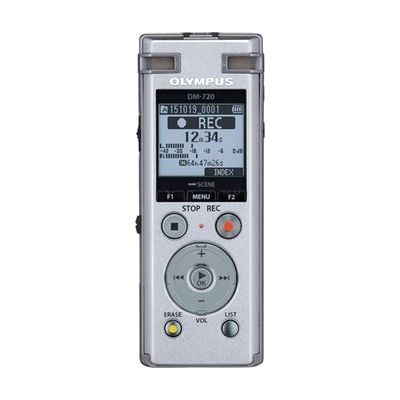
Olympus Digital Recorder DM-720
by Olympus
Price is what the vendor listed when last checked. Confirm it with the vendor before buying.
Last verified September 20, 2026 · classified April 26, 2026
What it is
Summary
AI-generated from vendor-published content · April 26, 2026
The Olympus DM-720 is a digital voice recorder that includes a Voice Guidance feature — spoken audio feedback that walks you through menus, folder navigation, and setup — making it usable without needing to read the screen. It's a good fit for someone with low vision or blindness who needs to independently record meetings, lectures, medical appointments, or personal notes. The device comes ready to use with 4GB of built-in storage, a built-in speaker, and a pop-out USB connector for transferring files to a computer — no dock or extra cables required. While the Voice Guidance helps with navigation, file management on a computer may still require accessible software (like a screen reader) to work independently.
Quick Facts Catalog facts · auto-generated
- AT Act lending
- Out of pocket
- Vocational rehab
What Setup Looks Like
- Out of the box
- Insert batteries or charge via USB, then power on — the recorder works out of the box for basic recording.
- Activate Voice Guidance in the settings menu to enable spoken menu feedback.
- With a guide
- Review the user manual or an accessibility-focused tutorial to learn folder organization and recording quality settings.
- Connect via built-in USB plug to a computer and use accessible file management software to organize recordings — allow 20–30 minutes for initial setup. See manufacturer support resources for detailed instructions.
Getting it
Try Before You Buy
Devices like this are often available to borrow through your state's AT Act program — typically free or low-cost — so you can try it before buying or pursuing funding.
Where to Get It
This is the vendor WhatCanHelp tracks for this product — it may also be available from other retailers or a local supplier, and prices vary.
Some links may be affiliate links — WhatCanHelp may earn a small commission from purchases at no extra cost to you. More on affiliates →
As an Amazon Associate we earn from qualifying purchases.
How to Fund This
Equipment like this is often pursued through official state programs. These are common starting points — each program decides its own eligibility and what it covers, so the first step is always a phone call.
Compare & explore
Sources & fine print
Vendor facts (name, price, platforms, vendor link) sourced from Olympus — view on vendor site; last verified September 20, 2026.
Classification & description AI-generated from vendor-published content on April 26, 2026 · confidence: medium. Vendor specs may lag; verify before relying on details in a clinical or funding artifact.