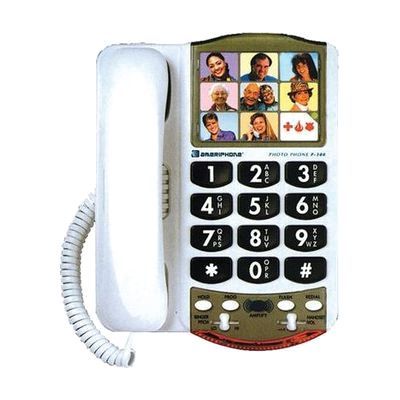
Photo Phone by Clarity
by Clarity
Price is what the vendor listed when last checked. Confirm it with the vendor before buying.
Last verified September 20, 2026 · classified April 26, 2026
What it is
Summary
AI-generated from vendor-published content · April 26, 2026
The Photo Phone is a corded landline telephone with nine large buttons, each designed to hold a small photo, so callers can dial a contact simply by pressing that person's picture rather than entering a number. It's well-suited for someone with memory difficulties, low vision, or cognitive challenges who finds a standard phone confusing or hard to operate independently — and it works for seniors aging in place as much as for adults with developmental disabilities. The phone comes ready to use as a standard telephone with the photo-dial feature as an overlay; you'll need to program each button with a phone number and insert photos, which takes a few minutes per contact. It includes built-in amplification (up to 20 dB) and telecoil (T-coil) compatibility for hearing aid users, but the photo spaces are quite small at about 1 inch wide, so portrait photos need to be cropped tightly to be recognizable.
Quick Facts Catalog facts · auto-generated
- AT Act lending
- Medicaid waiver
- Out of pocket
What Setup Looks Like
- Out of the box
Plug the phone into a standard phone jack and power outlet — it works as a regular corded phone right away. - With a guide
- Program each of the nine photo buttons by following the keypad entry steps in the included instructions — allow about 10-15 minutes to set up all contacts.
- Trim and insert a small photo (approximately 1" x 0.75") into each button's frame to label who each button calls.
- Adjust the amplification and tone settings using the side controls based on the user's hearing needs. See manufacturer support resources for detailed instructions.
Getting it
Try Before You Buy
Devices like this are often available to borrow through your state's AT Act program — typically free or low-cost — so you can try it before buying or pursuing funding.
Where to Get It
This is the vendor WhatCanHelp tracks for this product — it may also be available from other retailers or a local supplier, and prices vary.
Some links may be affiliate links — WhatCanHelp may earn a small commission from purchases at no extra cost to you. More on affiliates →
As an Amazon Associate we earn from qualifying purchases.
How to Fund This
Equipment like this is often pursued through official state programs. These are common starting points — each program decides its own eligibility and what it covers, so the first step is always a phone call.
Compare & explore
Sources & fine print
Vendor facts (name, price, platforms, vendor link) sourced from Clarity — view on vendor site; last verified September 20, 2026.
Classification & description AI-generated from vendor-published content on April 26, 2026 · confidence: high. Vendor specs may lag; verify before relying on details in a clinical or funding artifact.