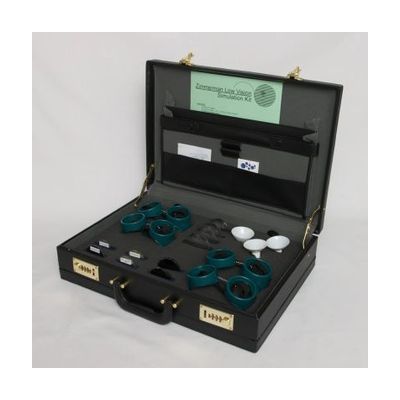
Zimmerman Low Vision Simulation Kit
Price is what the vendor listed when last checked. Confirm it with the vendor before buying.
What it is
Summary
AI-generated from vendor-published content · October 1, 2026
The Zimmerman Low Vision Simulation Kit lets a sighted person experience a range of vision conditions by wearing the goggles and lenses. It is a teaching tool for instructors, eye care and rehabilitation professionals, and anyone running workshops or training on low vision. You can create 11 different simulations, including four levels of acuity loss, three degrees of tunnel vision, and lenses for macular degeneration, cataracts, scotomas (blind spots), and bilateral hemianopsia. Everything comes in an attaché carrying case. These are approximate simulations meant for teaching and awareness, so they show what a condition can look like, not exactly what any one person sees.
Getting it
Many states lend devices like this for trial periods, free or at low cost — find your state's AT lending program.
Where to get it
This is the vendor WhatCanHelp tracks for this product — it may also be available from other retailers or a local supplier, and prices vary.
How to fund this
These are common places to ask about paying for equipment like this. Each one decides its own eligibility and what it covers, so start by asking them.
Details
Quick Facts Catalog facts · auto-generated
- Addresses
- Platform
- Age range
- Complexity
- Professional guidance helps
- Price
- $465.00
- Funding
- Out of pocket
- Vocational rehab
What setup looks like
- Out of the box
Open the case and try each goggle, funnel, or lens to see what it does. Basic use takes only a few minutes. - With a guide
Plan which conditions to demonstrate for your group, and the order to show them in. - With professional help
A low vision specialist, orientation and mobility instructor, or eye care professional can help match the simulations to your audience and explain what each one does and doesn't show. Plan on an hour or so of preparation before a first workshop.
Compare & explore
Sources & fine print
Vendor facts (name, price, platforms, vendor link) sourced from Independent Living Aids — view on vendor site (opens in a new tab); last checked November 4, 2026.
Classification & description AI-generated from vendor-published content on October 1, 2026 · confidence: high. Vendor specs may lag; verify before relying on details in a clinical or funding artifact.