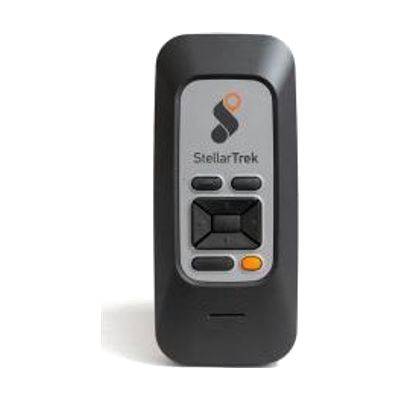
StellarTrek AI Powered Talking Mobility Device
by HumanWare
$999.00 ▲ $8.24 (1%)
Price is what the vendor listed when last checked. Confirm it with the vendor before buying.
Last verified September 20, 2026 · classified May 9, 2026
What it is
Summary
AI-generated from vendor-published content · May 9, 2026
The StellarTrek is a standalone GPS navigation and orientation device built specifically for people who are blind or have low vision — it does what a smartphone navigation app can't, because it's engineered around the full pedestrian journey rather than turn-by-turn driving directions. It announces intersections, detects crosswalks, identifies building doors and street addresses using onboard AI and optical sensors, and provides audio guidance for that last 40 feet where GPS alone goes fuzzy. Beyond navigation, it includes a color identifier, barcode reader, and OCR text reader in the same pocket-sized device, so it also handles common daily reading tasks without needing a phone. The physical design uses tactile buttons rather than a touchscreen, which matters enormously for eyes-free use in real outdoor environments. Battery runs all day and it's fully self-contained — no smartphone tethering required — but getting the most from features like POI searching and transit lookups will take some learning time, and users new to dedicated O&M devices will likely benefit from a session with an orientation and mobility specialist to build confident, efficient workflows.
Quick Facts Catalog facts · auto-generated
- AT Act lending
- Medicaid waiver
- Out of pocket
- Vocational rehab
What Setup Looks Like
- Out of the box
- Power on and use basic GPS navigation right away — tactile buttons and voice prompts guide operation without a screen.
- Download free maps for your region via the device's built-in connectivity.
- With a guide
- Configure language settings, preferred voice speed, and route preferences.
- Learn the button layout and command shortcuts for POI lookup, transit, and reading apps — estimate 1–2 hours with the user manual or video tutorials.
- See manufacturer support resources for detailed instructions.
- With professional help
- An orientation and mobility (O&M) specialist can introduce the device in real outdoor environments, building routes and teaching crosswalk/door detection features contextually.
- Expect 2–4 sessions over several weeks to establish confident independent use.
Getting it
Try Before You Buy
Devices like this are often available to borrow through your state's AT Act program — typically free or low-cost — so you can try it before buying or pursuing funding.
Where to Get It
These are the vendors WhatCanHelp tracks for this product — it may also be available from other retailers or a local supplier, and prices vary.
Some links may be affiliate links — WhatCanHelp may earn a small commission from purchases at no extra cost to you. More on affiliates →
As an Amazon Associate we earn from qualifying purchases.
How to Fund This
Equipment like this is often pursued through official state programs. These are common starting points — each program decides its own eligibility and what it covers, so the first step is always a phone call.
Compare & explore
Sources & fine print
Vendor facts (name, price, platforms, vendor link) sourced from HumanWare — view on vendor site; last verified September 20, 2026.
Classification & description AI-generated from vendor-published content on May 9, 2026 · confidence: high. Vendor specs may lag; verify before relying on details in a clinical or funding artifact.