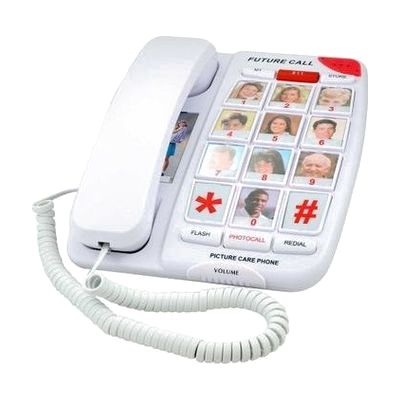
Future Call FC-1007 Senior Telephone for Elderly | Photo Buttons
by Future Call
Last verified June 16, 2026 · classified May 31, 2026
What it is
Summary
AI-generated from vendor-published content · May 31, 2026
This is a corded landline phone designed for people who have difficulty remembering phone numbers or navigating small buttons — particularly older adults with early cognitive changes, low vision, or hearing loss. Ten large buttons accept printed photos or pictures, so calling a family member means pressing their face rather than recalling a number. The phone amplifies incoming audio up to 40dB and includes a visual ring indicator, making it useful for someone with mild-to-moderate hearing loss as well. This is a complete, plug-in-and-use solution — you program the memory buttons once, slip photos under the covers, and it's ready. The one real limitation is that it requires a traditional landline; it won't work with VoIP-only setups unless you have an ATA adapter.
Quick Facts Catalog facts · auto-generated
- AT Act lending
- Medicaid waiver
- Out of pocket
What Setup Looks Like
- Out of the box
Plug into a phone jack — the phone is line-powered and works immediately for basic dialing. - With a guide
- Program each of the 10 memory buttons with the desired phone numbers using the keypad.
- Insert photos or printed pictures under each button cover to label who each button calls.
- Set the dial mode switch to one-touch or two-touch depending on the user's preference — allow 15-20 minutes total. See manufacturer support resources for detailed instructions.
Getting it
Try Before You Buy
Devices like this are often available to borrow through your state's AT Act program — typically free or low-cost — so you can try it before buying or pursuing funding.
Where to Get It
Some links may be affiliate links — WhatCanHelp may earn a small commission from purchases at no extra cost to you. More on affiliates →
How to Fund This
Equipment like this is often pursued through official state programs. These are common starting points — each program decides its own eligibility and what it covers, so the first step is always a phone call.
Compare & explore
Sources & fine print
Vendor facts (name, price, platforms, vendor link) sourced from Future Call — view on vendor site; last verified June 16, 2026.
Classification & description AI-generated from vendor-published content on May 31, 2026 · confidence: high. Vendor specs may lag; verify before relying on details in a clinical or funding artifact.