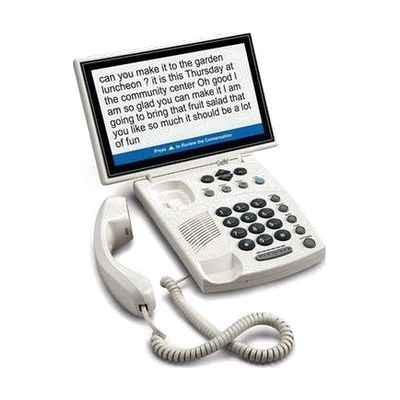
CapTel 880i Telephone | 10" Screen | Captions Calls Clearly
by Ultratec
Last verified July 28, 2026 · classified May 31, 2026
What it is
Summary
AI-generated from vendor-published content · May 31, 2026
The CapTel 880i displays real-time captions of the other person's words on a 10-inch screen while you talk — no relay operator involved, just automatic speech-to-text via an internet connection. It's designed for people with hearing loss who still have usable voice, or anyone who misses words on phone calls and wants a readable backup alongside the audio. This is a complete, plug-in solution: connect it to a phone line and your home internet (including Wi-Fi), and captions start appearing automatically on every call without the other party doing anything differently. The 880i also includes a built-in answering machine that captions voice messages, and font size and color are adjustable — useful for people managing both hearing loss and low vision. Captioning is a free service but requires an active internet connection, and captions only work for calls within the United States.
Quick Facts Catalog facts · auto-generated
- AT Act lending
- Medicaid waiver
- Out of pocket
What Setup Looks Like
- Out of the box
Plug into a standard phone jack and power outlet — handset works as a normal amplified phone immediately. - With a guide
- Connect to your home internet via ethernet or configure Wi-Fi using the on-screen setup menu.
- Adjust font size, color contrast, and caption toggle settings to personal preference.
- Full setup typically takes 15–30 minutes with the included guide. See manufacturer support resources for detailed instructions.
Getting it
Try Before You Buy
Devices like this are often available to borrow through your state's AT Act program — typically free or low-cost — so you can try it before buying or pursuing funding.
Where to Get It
This is the vendor WhatCanHelp tracks for this product — it may also be available from other retailers or a local supplier, and prices vary.
Some links may be affiliate links — WhatCanHelp may earn a small commission from purchases at no extra cost to you. More on affiliates →
As an Amazon Associate we earn from qualifying purchases.
How to Fund This
Equipment like this is often pursued through official state programs. These are common starting points — each program decides its own eligibility and what it covers, so the first step is always a phone call.
Compare & explore
Sources & fine print
Vendor facts (name, price, platforms, vendor link) sourced from Ultratec — view on vendor site; last verified July 28, 2026.
Classification & description AI-generated from vendor-published content on May 31, 2026 · confidence: high. Vendor specs may lag; verify before relying on details in a clinical or funding artifact.