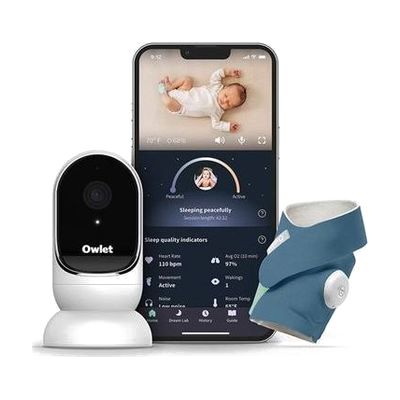
Owlet Dream Duo | Smart HD Video Baby Monitor + Sock
by Owlet
Last verified June 16, 2026 · classified May 31, 2026
What it is
Summary
AI-generated from vendor-published content · May 31, 2026
The Dream Duo pairs a wearable smart sock with a 1080p HD video monitor to track an infant's heart rate, blood oxygen levels, and sleep patterns in real time, with alerts sent to a parent's phone when readings fall outside normal ranges. This bundle is particularly relevant for parents who are Deaf or hard of hearing — Diglo carries it specifically because the app-based notifications provide visual and vibrating alerts that replace the auditory cues a hearing parent might catch naturally. The system requires WiFi, a smartphone, and the Owlet app to function; the sock and camera are hardware that only deliver their value through that app ecosystem. The Dream Sock subscription model has changed over the years, so confirm current pricing for ongoing health-tracking features before purchasing — some advanced data views require a paid plan beyond the hardware cost.
Quick Facts Catalog facts · auto-generated
- AT Act lending
- Out of pocket
What Setup Looks Like
- Out of the box
Unbox camera and position it aimed at the crib — it powers on and streams video immediately over WiFi once connected. - With a guide
- Download the Owlet app and create an account.
- Connect the Dream Cam to your home WiFi network through the app setup wizard.
- Charge the Dream Sock, pair it via the app, and fit it on baby's foot according to sizing guide.
- Configure alert thresholds and notification preferences — full setup typically takes 30-45 minutes. See manufacturer support resources for detailed instructions.
Getting it
Try Before You Buy
Devices like this are often available to borrow through your state's AT Act program — typically free or low-cost — so you can try it before buying or pursuing funding.
Where to Get It
Some links may be affiliate links — WhatCanHelp may earn a small commission from purchases at no extra cost to you. More on affiliates →
Wondering how equipment like this gets paid for? See the official funding programs in your state.
Compare & explore
Sources & fine print
Vendor facts (name, price, platforms, vendor link) sourced from Owlet — view on vendor site; last verified June 16, 2026.
Classification & description AI-generated from vendor-published content on May 31, 2026 · confidence: high. Vendor specs may lag; verify before relying on details in a clinical or funding artifact.