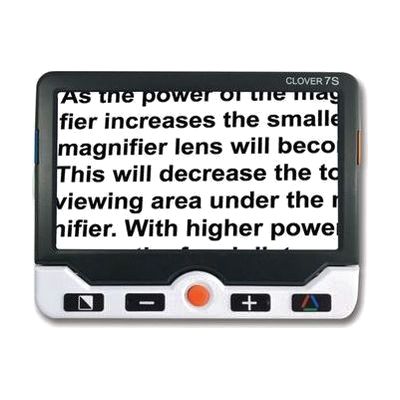
Clover 7HD Handheld Video Magnifier
by Clover (likely Zoomax or similar OEM; listed under MaxiAids)
Last verified June 17, 2026 · classified May 31, 2026
What it is
Summary
AI-generated from vendor-published content · May 31, 2026
A 7-inch handheld video magnifier that enlarges text, images, and objects in real time across a magnification range of roughly 2.4x to 28x — enough to make most printed material readable for people with moderate to severe low vision. The built-in fold-away stand props the device at a comfortable angle for reading a book or writing on paper without holding it up the whole time, which matters a lot for fatigue during longer tasks. You get the full package here: camera, display, controls, rechargeable battery, and stand in one unit — nothing extra to buy to start using it. Battery life is about 3 hours per charge, which is shorter than some competing models in this price range, so heavy users may want to charge between sessions.
Quick Facts Catalog facts · auto-generated
- AT Act lending
- Medicaid waiver
- Out of pocket
- Vocational rehab
What Setup Looks Like
- Out of the box
- Charge the device fully before first use (approximately 5 hours).
- Power on and hold over any text or image — autofocus engages automatically.
- Use the joystick and button panel to adjust magnification and color modes.
- With a guide
- Review the manual to configure preferred color enhancement modes and save favorites.
- Set up the adjustable reading line and masking features to reduce visual clutter.
- Connect via HDMI to a monitor or TV for larger display viewing if needed — allow 15–20 minutes total. See manufacturer support resources for detailed instructions.
Getting it
Try Before You Buy
Devices like this are often available to borrow through your state's AT Act program — typically free or low-cost — so you can try it before buying or pursuing funding.
Where to Get It
Some links may be affiliate links — WhatCanHelp may earn a small commission from purchases at no extra cost to you. More on affiliates →
How to Fund This
Equipment like this is often pursued through official state programs. These are common starting points — each program decides its own eligibility and what it covers, so the first step is always a phone call.
Compare & explore
Sources & fine print
Vendor facts (name, price, platforms, vendor link) sourced from Clover (likely Zoomax or similar OEM; listed under MaxiAids) — view on vendor site; last verified June 17, 2026.
Classification & description AI-generated from vendor-published content on May 31, 2026 · confidence: high. Vendor specs may lag; verify before relying on details in a clinical or funding artifact.