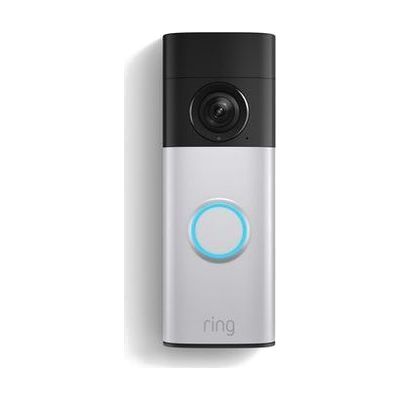
Battery Doorbell Plus (2nd Gen) – Doorbell Camera
$179.99 ▲ $80.00 (80%)
Last verified July 28, 2026 · classified June 7, 2026
What it is
Summary
AI-generated from vendor-published content · June 7, 2026
The Ring Battery Doorbell Plus (2nd Gen) is a wireless video doorbell that lets users see, hear, and speak with whoever is at the door from a smartphone — without needing to physically go to the door or hear a traditional chime. For people who are deaf or hard of hearing, have mobility limitations, or experience anxiety answering the door, this fills a real gap: visual and push alerts replace auditory-only doorbells, and two-way talk handles the interaction remotely. It runs on a rechargeable quick-release battery pack, so no hardwiring is required. The catch is that it's not a complete solution on its own — for users who are deaf or hard of hearing, it needs to pair with a compatible Ring Chime or smart lighting system to deliver truly accessible visual/vibrating alerts throughout the home, and it requires ongoing smartphone access and a Ring account to function.
Quick Facts Catalog facts · auto-generated
- AT Act lending
- Out of pocket
- Vocational rehab
What Setup Looks Like
- Out of the box
Mount to door frame using included hardware (or adhesive mount, sold separately), charge battery pack, and use Ring app to complete setup — most users are live within 20-30 minutes. - With a guide
- Download the Ring app and create an account before unboxing.
- Follow in-app setup wizard to connect the doorbell to your home Wi-Fi.
- For deaf/HoH users, configure alert chimes or integrate with smart lighting (Ring Chime, Alexa, or third-party systems) for visual/tactile notification — allow an additional 15-30 minutes.
- See Ring support resources for detailed instructions.
Getting it
Try Before You Buy
Devices like this are often available to borrow through your state's AT Act program — typically free or low-cost — so you can try it before buying or pursuing funding.
Where to Get It
This is the vendor WhatCanHelp tracks for this product — it may also be available from other retailers or a local supplier, and prices vary.
Some links may be affiliate links — WhatCanHelp may earn a small commission from purchases at no extra cost to you. More on affiliates →
As an Amazon Associate we earn from qualifying purchases.
How to Fund This
Equipment like this is often pursued through official state programs. These are common starting points — each program decides its own eligibility and what it covers, so the first step is always a phone call.
Compare & explore
Sources & fine print
Vendor facts (name, price, platforms, vendor link) sourced from Ring (Amazon) — view on vendor site; last verified July 28, 2026.
Classification & description AI-generated from vendor-published content on June 7, 2026 · confidence: high. Vendor specs may lag; verify before relying on details in a clinical or funding artifact.