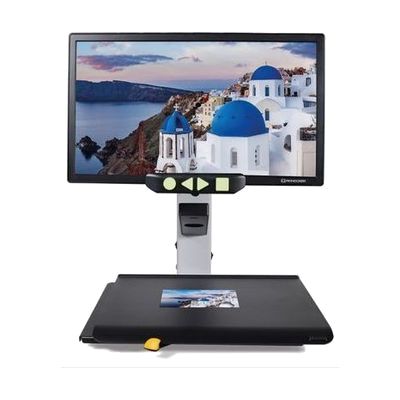
Reinecker Videomatic 22" Electronic Magnifier
by Reinecker
Price is what the vendor listed when last checked. Confirm it with the vendor before buying.
Last verified September 19, 2026 · classified June 7, 2026
What it is
Summary
AI-generated from vendor-published content · June 7, 2026
A desktop video magnifier with a 22-inch full HD monitor that displays whatever is placed on its XY reading table at magnification levels from 4x to 42x with autofocus. This is built for someone who reads, writes, or does close work daily — mail, books, medication labels, handwriting — and needs more than handheld magnification can realistically provide. The swivel-tilt monitor arm, XY table with brake, and six color contrast modes (including high-contrast options that can help with certain retinal conditions) make sustained reading sessions more comfortable than portable alternatives. Reinecker has been making this line since 1971, so the build quality is genuinely durable, but at 26 pounds this is a desk fixture, not something you'll move between rooms. The price puts it at the higher end of 22-inch desktop CCTVs — comparable units from other manufacturers come in lower, so it's worth demoing before purchasing.
Quick Facts Catalog facts · auto-generated
- AT Act lending
- Insurance
- Medicaid waiver
- Out of pocket
- Vocational rehab
What Setup Looks Like
- Out of the box
Place unit on a stable desk, connect power, and place reading material on the XY table — the autofocus camera produces a magnified image on screen immediately. - With a guide
- Adjust monitor height and swivel angle to suit seating posture using the articulating arm.
- Cycle through color contrast modes and brightness settings using the four tactile buttons to find the most comfortable display for your vision.
- Access the internal menu to set preferred magnification range and any personalized parameters — allow 20-30 minutes for initial customization. See manufacturer support resources for detailed instructions.
- With professional help
- A low vision specialist or optometrist can determine whether a 22-inch desktop magnifier is the appropriate form factor versus portable or head-mounted alternatives.
- An orientation and mobility (O&M) specialist or ATP can optimize workstation setup, contrast settings, and reading strategies — typically one clinical session.
Getting it
Try Before You Buy
Devices like this are often available to borrow through your state's AT Act program — typically free or low-cost — so you can try it before buying or pursuing funding.
Where to Get It
This is the vendor WhatCanHelp tracks for this product — it may also be available from other retailers or a local supplier, and prices vary.
Some links may be affiliate links — WhatCanHelp may earn a small commission from purchases at no extra cost to you. More on affiliates →
As an Amazon Associate we earn from qualifying purchases.
How to Fund This
Equipment like this is often pursued through official state programs. These are common starting points — each program decides its own eligibility and what it covers, so the first step is always a phone call.
Compare & explore
Sources & fine print
Vendor facts (name, price, platforms, vendor link) sourced from Reinecker — view on vendor site; last verified September 19, 2026.
Classification & description AI-generated from vendor-published content on June 7, 2026 · confidence: high. Vendor specs may lag; verify before relying on details in a clinical or funding artifact.