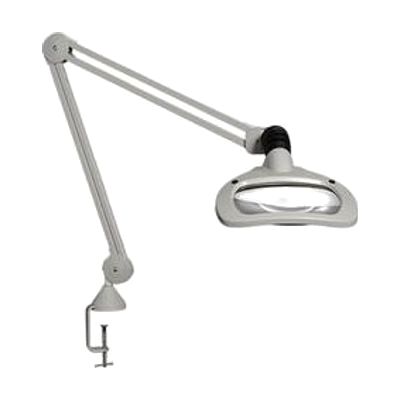
Luxo 5D Wave+LED Magnifier 45" Arm with Clamp
by Luxo
Last verified June 19, 2026 · classified June 7, 2026
What it is
Summary
AI-generated from vendor-published content · June 7, 2026
This is a professional-grade illuminated magnifier on a 45-inch articulating arm, designed for extended hands-free close work. The large 6.75" × 4.5" optical glass lens provides 2.25x magnification (5 diopters) — enough for reading fine print, examining labels, or doing detailed tasks without straining. The dual dimmable LED panels allow independent left/right lighting control, which helps reduce glare and shadows depending on the task and the user's visual needs. It clamps to a desk edge and holds its position without tightening knobs, so repositioning is quick. This is a complete, self-contained unit — just clamp it, plug it in, and use it — though the 5-diopter lens won't be sufficient for users with more significant vision loss who need 10+ diopters. The 45-inch arm gives good coverage across a work surface, but the clamp mount requires a desk edge thick enough to grip securely.
Quick Facts Catalog facts · auto-generated
- AT Act lending
- Out of pocket
- Vocational rehab
What Setup Looks Like
- Out of the box
- Attach the edge clamp to a desk or table surface.
- Plug in the power cord and switch on the lamp — ready to use immediately.
- With a guide
- Adjust arm height and angle to position the lens at a comfortable working distance (typically 8–12 inches above the surface).
- Set left/right LED brightness independently to reduce glare or shadows for your specific task — takes 5–10 minutes to dial in. See manufacturer support resources for detailed instructions.
Getting it
Try Before You Buy
Devices like this are often available to borrow through your state's AT Act program — typically free or low-cost — so you can try it before buying or pursuing funding.
Where to Get It
Some links may be affiliate links — WhatCanHelp may earn a small commission from purchases at no extra cost to you. More on affiliates →
How to Fund This
Equipment like this is often pursued through official state programs. These are common starting points — each program decides its own eligibility and what it covers, so the first step is always a phone call.
Compare & explore
Sources & fine print
Vendor facts (name, price, platforms, vendor link) sourced from Luxo — view on vendor site; last verified June 19, 2026.
Classification & description AI-generated from vendor-published content on June 7, 2026 · confidence: high. Vendor specs may lag; verify before relying on details in a clinical or funding artifact.