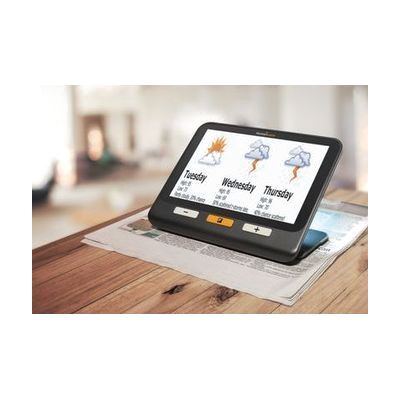
Explore 8 Handheld Electronic Magnifier
by HumanWare
Price is what the vendor listed when last checked. Confirm it with the vendor before buying.
Last verified September 20, 2026 · classified June 8, 2026
What it is
Summary
AI-generated from vendor-published content · June 8, 2026
The Explorē 8 is a handheld video magnifier with an 8-inch touchscreen — larger than most portable CCTVs in its class — that magnifies printed text, photos, and objects up to 30x in high-definition. It has two 21-megapixel cameras: one for close-up reading and one for distance viewing (menus, whiteboards, price tags), switching between them automatically based on how you're holding it. This is a complete, self-contained device — no phone, tablet, or computer needed. At just over $1,200, it sits at the upper end of handheld magnifiers; buyers should compare it against tablet-based solutions if budget is a concern, and the 8-inch screen, while excellent for readability, makes it noticeably larger to carry than 5- or 6-inch alternatives.
Quick Facts Catalog facts · auto-generated
- AT Act lending
- Insurance
- Medicaid waiver
- Out of pocket
- Vocational rehab
What Setup Looks Like
- Out of the box
Charge the device fully, then power on — camera and magnification work immediately without any account or pairing. - With a guide
- Adjust default magnification level, color contrast mode, and preferred camera using the physical buttons or touchscreen menu.
- Takes 15–30 minutes to explore settings; manufacturer video tutorials available on the HumanWare website.
Getting it
Try Before You Buy
Devices like this are often available to borrow through your state's AT Act program — typically free or low-cost — so you can try it before buying or pursuing funding.
Where to Get It
This is the vendor WhatCanHelp tracks for this product — it may also be available from other retailers or a local supplier, and prices vary.
Some links may be affiliate links — WhatCanHelp may earn a small commission from purchases at no extra cost to you. More on affiliates →
As an Amazon Associate we earn from qualifying purchases.
How to Fund This
Equipment like this is often pursued through official state programs. These are common starting points — each program decides its own eligibility and what it covers, so the first step is always a phone call.
Compare & explore
Sources & fine print
Vendor facts (name, price, platforms, vendor link) sourced from HumanWare — view on vendor site; last verified September 20, 2026.
Classification & description AI-generated from vendor-published content on June 8, 2026 · confidence: high. Vendor specs may lag; verify before relying on details in a clinical or funding artifact.