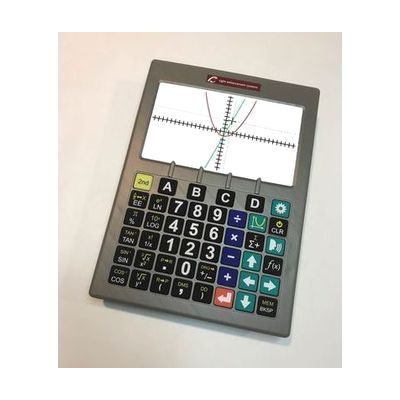
SciPlus 3500 - Talking Graphing Calculator
by SciPlus
Price is what the vendor listed when last checked. Confirm it with the vendor before buying.
Last verified September 20, 2026 · classified June 8, 2026
What it is
Summary
AI-generated from vendor-published content · June 8, 2026
The SciPlus 3500 is a standalone talking graphing calculator built specifically for students and professionals with low vision who need to do serious math — scientific, statistical, trig, fractions, and graphing — without relying on screen magnification software or a separate device. It speaks results aloud through a built-in voice and includes a 7-inch full-color display with high-contrast color schemes (white on black, yellow on black) and large tactile keys at 16mm each. This is a complete, self-contained solution: calculator, speech output, carry case, earbud, and USB charger are all included. The tradeoff is size and weight — at over a pound, this is a desk tool rather than something that slips into a pocket, and the dedicated hardware means no app updates or expandability over time.
Quick Facts Catalog facts · auto-generated
- AT Act lending
- Out of pocket
- School district
- Vocational rehab
What Setup Looks Like
- Out of the box
- Charge via included USB cable.
- Power on — speech output and display are active by default.
- Adjust contrast color scheme (white on black or yellow on black) to personal preference using display settings.
- With a guide
- Review the user manual to learn graphing and function-analysis features (y-intercepts, poles, curve analysis).
- Practice speech output settings and earphone jack use for private/quiet environments — allow 30–60 minutes to become comfortable with key layout and voice navigation.
Getting it
Try Before You Buy
Devices like this are often available to borrow through your state's AT Act program — typically free or low-cost — so you can try it before buying or pursuing funding.
Where to Get It
These are the vendors WhatCanHelp tracks for this product — it may also be available from other retailers or a local supplier, and prices vary.
Some links may be affiliate links — WhatCanHelp may earn a small commission from purchases at no extra cost to you. More on affiliates →
As an Amazon Associate we earn from qualifying purchases.
How to Fund This
Equipment like this is often pursued through official state programs. These are common starting points — each program decides its own eligibility and what it covers, so the first step is always a phone call.
Compare & explore
Sources & fine print
Vendor facts (name, price, platforms, vendor link) sourced from SciPlus — view on vendor site; last verified September 20, 2026.
Classification & description AI-generated from vendor-published content on June 8, 2026 · confidence: high. Vendor specs may lag; verify before relying on details in a clinical or funding artifact.