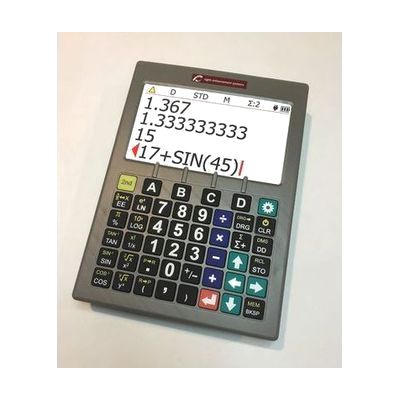
SciPlus 3200 Low Vision Scientific Calculator
by SciPlus
Price is what the vendor listed when last checked. Confirm it with the vendor before buying.
What it is
Summary
AI-generated from vendor-published content · October 1, 2026
The SciPlus 3200 is a scientific calculator built for people who can't comfortably use a standard one because of low vision. It has a 7-inch color screen showing four lines, and you can adjust the brightness and pick a two-color, high-contrast look like white on black, black on white, or yellow on black. The keys are large, high-contrast, and tactile, about 0.7 inch (16mm) each, and it covers the usual math, scientific, and trigonometric functions. It weighs about 20 ounces, comes with a rechargeable battery and charger, and includes a large print manual. It's a newer version of the SciPlus 2200 with a bigger, sharper screen.
Getting it
Try before you buy
Devices like this are often available to borrow through your state's AT Act program — typically free or low-cost — so you can try it before buying or pursuing funding.
Where to get it
These are the vendors WhatCanHelp tracks for this product — it may also be available from other retailers or a local supplier, and prices vary.
How to fund this
These are common places to ask about paying for equipment like this. Each one decides its own eligibility and what it covers, so start by asking them.
Details
Quick Facts Catalog facts · auto-generated
- Type
- Addresses
- Platform
- Age range
- Complexity
- Ready to use
- Price
- $446.00
- Funding
- AT Act lending
- Out of pocket
- School district
- Vocational rehab
What setup looks like
- Out of the box
- Charge the battery with the included charger, then power on the calculator and start entering problems.
- Choose a display color mode (white on black, black on white, or yellow on black) and adjust the brightness until the screen is comfortable to read.
Compare & explore
Sources & fine print
Vendor facts (name, price, platforms, vendor link) sourced from LS&S — view on vendor site (opens in a new tab); last checked November 4, 2026.
Classification & description AI-generated from vendor-published content on October 1, 2026 · confidence: high. Vendor specs may lag; verify before relying on details in a clinical or funding artifact.