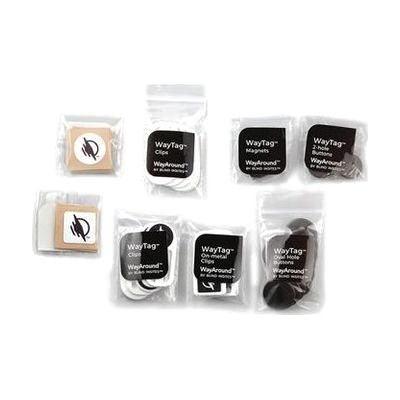
WayAround Starter Pack
by wayaround
Price is what the vendor listed when last checked. Confirm it with the vendor before buying.
Last verified September 20, 2026 · classified June 8, 2026
What it is
Summary
AI-generated from vendor-published content · June 8, 2026
WayAround is an NFC-based labeling system designed for people with visual impairments who need a reliable way to identify everyday items — clothing, medications, food containers, files — without relying on printed labels they can't read. You attach small NFC tags (stickers, magnets, buttons, or clips) to objects, then use the free WayAround app on your iPhone or Android to write descriptions, washing instructions, expiration dates, or any other information to that tag. From then on, holding your phone near the tag reads the stored info aloud via VoiceOver or TalkBack. This Starter Pack includes 60 tags across all available form factors, which is genuinely useful for figuring out which tag type works best for different surfaces before buying in bulk. The system requires a compatible NFC-capable smartphone — it won't work as a standalone device — and setup does take time upfront since every tag needs to be individually programmed before it becomes useful.
Quick Facts Catalog facts · auto-generated
- AT Act lending
- Out of pocket
- Vocational rehab
What Setup Looks Like
- Out of the box
Attach a WayTag to any object using the appropriate form factor — sticker, magnet, clip, or button. - With a guide
- Download the free WayAround app from the App Store or Google Play onto an NFC-capable smartphone.
- Enable VoiceOver (iOS) or TalkBack (Android) if you want spoken readback of tag content.
- Hold your phone near a tag to open it in the app, then type or record a label and any additional details.
- Scan the tag again anytime to hear the stored information read aloud — plan 30–60 minutes to tag a typical first batch of items. See manufacturer support resources for detailed instructions.
Getting it
Try Before You Buy
Devices like this are often available to borrow through your state's AT Act program — typically free or low-cost — so you can try it before buying or pursuing funding.
Where to Get It
This is the vendor WhatCanHelp tracks for this product — it may also be available from other retailers or a local supplier, and prices vary.
Some links may be affiliate links — WhatCanHelp may earn a small commission from purchases at no extra cost to you. More on affiliates →
As an Amazon Associate we earn from qualifying purchases.
How to Fund This
Equipment like this is often pursued through official state programs. These are common starting points — each program decides its own eligibility and what it covers, so the first step is always a phone call.
Compare & explore
Sources & fine print
Vendor facts (name, price, platforms, vendor link) sourced from wayaround — view on vendor site; last verified September 20, 2026.
Classification & description AI-generated from vendor-published content on June 8, 2026 · confidence: high. Vendor specs may lag; verify before relying on details in a clinical or funding artifact.