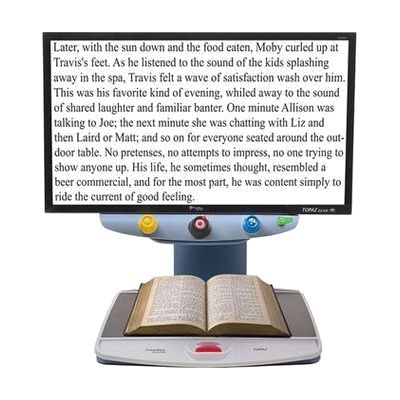
TOPAZ EZ HD Desktop Video Magnifier
Price is what the vendor listed when last checked. Confirm it with the vendor before buying.
Last verified September 16, 2026 · classified April 26, 2026
What it is
Summary
AI-generated from vendor-published content · April 26, 2026
The TOPAZ EZ HD is a desktop video magnifier that uses a high-definition camera mounted on an arm above a reading surface to display enlarged text and images on a built-in screen. It's designed for people with low vision who need to read printed materials, view photos, handle mail, or do close work like writing checks or reading medication labels at home or in an office. This is a self-contained unit — the camera, screen, and controls are all integrated, so there's no separate computer or monitor required. At $2,000 it's a significant investment, and because individuals with low vision have varying needs around magnification range, color contrast modes, and screen size, it's worth a trial or consultation with a low vision specialist before purchasing.
Quick Facts Catalog facts · auto-generated
- AT Act lending
- Insurance
- Medicaid waiver
- Out of pocket
- Vocational rehab
What Setup Looks Like
- Out of the box
Place unit on a flat surface, power on, and slide reading material under the camera to see magnified image on the built-in screen. - With a guide
- Adjust the default magnification level and preferred color contrast mode (e.g., black-on-white, yellow-on-black) using the controls.
- Review the user manual or Freedom Scientific's online tutorials to learn advanced features such as locator mode, freeze frame, and line guides — expect 20–30 minutes. See manufacturer support resources for detailed instructions.
- With professional help
- A low vision optometrist or certified low vision therapist (CLVT) can assess whether the TOPAZ EZ HD's magnification range and screen size match your functional vision needs before purchase.
- An occupational therapist (OT) or CLVT can provide 1–2 sessions on ergonomic positioning and feature configuration to maximize reading efficiency.
Getting it
Try Before You Buy
Devices like this are often available to borrow through your state's AT Act program — typically free or low-cost — so you can try it before buying or pursuing funding.
Where to Get It
This is the vendor WhatCanHelp tracks for this product — it may also be available from other retailers or a local supplier, and prices vary.
Some links may be affiliate links — WhatCanHelp may earn a small commission from purchases at no extra cost to you. More on affiliates →
As an Amazon Associate we earn from qualifying purchases.
How to Fund This
Equipment like this is often pursued through official state programs. These are common starting points — each program decides its own eligibility and what it covers, so the first step is always a phone call.
Compare & explore
Sources & fine print
Vendor facts (name, price, platforms, vendor link) sourced from Freedom Scientific — view on vendor site; last verified September 16, 2026.
Classification & description AI-generated from vendor-published content on April 26, 2026 · confidence: high. Vendor specs may lag; verify before relying on details in a clinical or funding artifact.