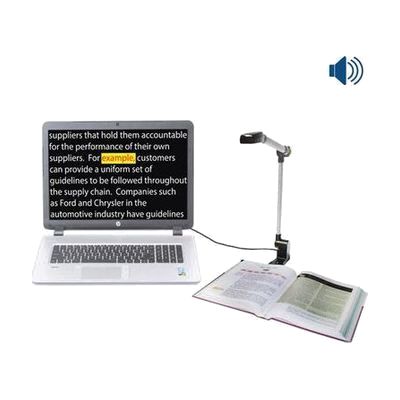
PEARL Portable Reading Camera
Price is what the vendor listed when last checked. Confirm it with the vendor before buying.
Last verified September 16, 2026 · classified April 26, 2026
What it is
Summary
AI-generated from vendor-published content · April 26, 2026
The PEARL is a portable USB camera designed to capture images of printed text and feed them into compatible screen-reading or OCR software — specifically Freedom Scientific's JAWS, Fusion, or OpenBook — which then reads the content aloud. It's built for blind or low-vision users who need access to books, mail, forms, or other paper documents without a bulky desktop setup. This is not a standalone product: it requires a Windows PC and one of the supported Freedom Scientific software titles installed and licensed to do anything useful. The camera folds flat into a roughly 14-by-3-inch form factor with a carrying case, which is convenient for travel, but you're still carrying a laptop to make it work.
Quick Facts Catalog facts · auto-generated
- AT Act lending
- Out of pocket
- School district
- Vocational rehab
What Setup Looks Like
- Out of the box
Unfold the PEARL camera and connect it via USB to a Windows PC with JAWS, Fusion, or OpenBook already installed and licensed. - With a guide
- Install or verify your Freedom Scientific software license (JAWS, Fusion, or OpenBook) is active on the target PC.
- Connect the PEARL via USB — driver installation typically happens automatically.
- Configure the scanning profile within your software for automatic page-turn detection or manual snapshot mode — allow 20–30 minutes for initial configuration. See manufacturer support resources for detailed instructions.
- With professional help
- A low vision specialist or assistive technology professional (ATP) can optimize OCR and voice settings within JAWS or OpenBook for the user's specific reading needs and vision profile.
- Expect one to two sessions totaling 1–3 hours for full workflow training.
Getting it
Try Before You Buy
Devices like this are often available to borrow through your state's AT Act program — typically free or low-cost — so you can try it before buying or pursuing funding.
Where to Get It
This is the vendor WhatCanHelp tracks for this product — it may also be available from other retailers or a local supplier, and prices vary.
Some links may be affiliate links — WhatCanHelp may earn a small commission from purchases at no extra cost to you. More on affiliates →
As an Amazon Associate we earn from qualifying purchases.
How to Fund This
Equipment like this is often pursued through official state programs. These are common starting points — each program decides its own eligibility and what it covers, so the first step is always a phone call.
Compare & explore
Sources & fine print
Vendor facts (name, price, platforms, vendor link) sourced from Freedom Scientific — view on vendor site; last verified September 16, 2026.
Classification & description AI-generated from vendor-published content on April 26, 2026 · confidence: high. Vendor specs may lag; verify before relying on details in a clinical or funding artifact.