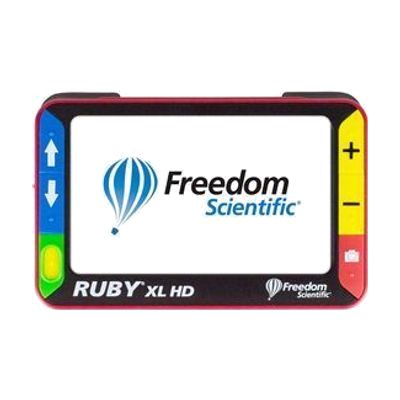
RUBY XL HD Handheld Video Magnifier
Contact vendor for pricing
What it is
Summary
AI-generated from vendor-published content · October 1, 2026
The RUBY XL HD is a pocket-friendly video magnifier that uses a camera to show enlarged print on its own 5-inch color screen. Zoom runs smoothly from 2x to 14x, and the 5-megapixel auto-focus camera keeps text sharp as you change magnification. A flip-out handle helps when you want to check a label, price tag, or short passage, and the screen tilts up so you can read comfortably at a table. It suits someone who finds standard optical magnifiers too limited for small print. Because the screen is only 5 inches, it works best for spot reading rather than long documents.
Getting it
Try before you buy
Devices like this are often available to borrow through your state's AT Act program — typically free or low-cost — so you can try it before buying or pursuing funding.
Where to get it
This is the vendor WhatCanHelp tracks for this product — it may also be available from other retailers or a local supplier, and prices vary.
How to fund this
These are common places to ask about paying for equipment like this. Each one decides its own eligibility and what it covers, so start by asking them.
Details
Quick Facts Catalog facts · auto-generated
- Addresses
- Platform
- Age range
- Complexity
- Ready to use
- Price
- —
- Funding
- AT Act lending
- Insurance
- Medicaid waiver
- Out of pocket
- Vocational rehab
What setup looks like
- Out of the box
- Pick up the magnifier, turn it on, and hold it over what you want to read. The auto-focus camera shows the enlarged image on the screen.
- Change the zoom between 2x and 14x until the text is comfortable to read.
- Flip out the handle for spot viewing, or tilt the screen up to read from a page on a table.
Compare & explore
Sources & fine print
Vendor facts (name, price, platforms, vendor link) sourced from Freedom Scientific — view on vendor site (opens in a new tab); last checked October 31, 2026.
Classification & description AI-generated from vendor-published content on October 1, 2026 · confidence: high. Vendor specs may lag; verify before relying on details in a clinical or funding artifact.