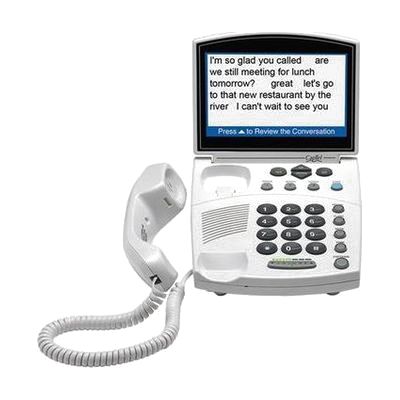
CapTel 840i Telephone
by Ultratec
Price is what the vendor listed when last checked. Confirm it with the vendor before buying.
What it is
Summary
AI-generated from vendor-published content · October 1, 2026
The CapTel 840i is a desk phone that shows word-for-word captions of your phone calls on a large 7-inch screen, so you can read what the other person says as you listen. It captions both incoming and outgoing calls, and you can turn captions on or off at any point in a call. It also has a built-in answering machine that captions voice messages, a phone book with room for 95+ names, and a Wi-Fi option so you can place it anywhere in range of your network. It needs both a phone line and an internet connection, and captions work only on calls within the United States. This is a good fit for someone who struggles to hear on the phone and also finds standard-sized captions hard to read.
Getting it
Try before you buy
Devices like this are often available to borrow through your state's AT Act program — typically free or low-cost — so you can try it before buying or pursuing funding.
Where to get it
This is the vendor WhatCanHelp tracks for this product — it may also be available from other retailers or a local supplier, and prices vary.
How to fund this
These are common places to ask about paying for equipment like this. Each one decides its own eligibility and what it covers, so start by asking them.
Details
Quick Facts Catalog facts · auto-generated
- Addresses
- Platform
- Complexity
- Setup with instructions
- Price
- $75.00
- Funding
- AT Act lending
- Medicaid waiver
- Out of pocket
What setup looks like
- Out of the box
Place the phone on a table near your phone jack and your router or Wi-Fi signal. - With a guide
- Connect the phone to your telephone line and to the internet, either by cable or over your Wi-Fi network.
- Follow the printed or online setup guide to register the phone and turn on the free captioning service.
- Make a test call, then adjust the captions, volume and phone book to suit you. Expect about 30 minutes in total.
Compare & explore
Sources & fine print
Vendor facts (name, price, platforms, vendor link) sourced from Diglo — view on vendor site (opens in a new tab); last checked October 31, 2026.
Classification & description AI-generated from vendor-published content on October 1, 2026 · confidence: high. Vendor specs may lag; verify before relying on details in a clinical or funding artifact.