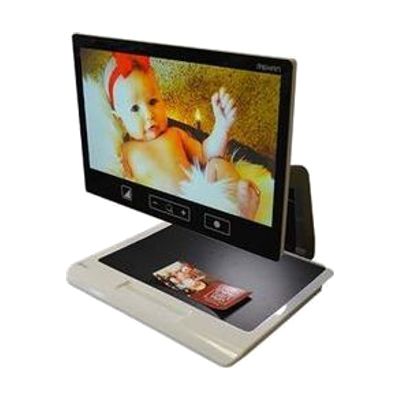
The Acuity 22-inch HD Desktop Video Magnifier
Price is what the vendor listed when last checked. Confirm it with the vendor before buying.
What it is
Summary
AI-generated from vendor-published content · October 1, 2026
The Acuity is a desktop video magnifier with a 22-inch full HD screen. It enlarges books, handwriting, and hobby work so you can see them in sharp detail. You can adjust magnification with a tactile remote, a touchpad, or the touchscreen, and switch between 20 high-contrast color modes and 2 photo modes. Its built-in LED lighting is designed to avoid glare and shadows on whatever you're viewing. It weighs about 35 pounds, so plan on picking a permanent spot for it.
Getting it
Try before you buy
Devices like this are often available to borrow through your state's AT Act program — typically free or low-cost — so you can try it before buying or pursuing funding.
Where to get it
This is the vendor WhatCanHelp tracks for this product — it may also be available from other retailers or a local supplier, and prices vary.
How to fund this
These are common places to ask about paying for equipment like this. Each one decides its own eligibility and what it covers, so start by asking them.
Details
Quick Facts Catalog facts · auto-generated
- Addresses
- Platform
- Age range
- Complexity
- Setup with instructions
- Price
- $2,995.00
- Funding
- AT Act lending
- Insurance
- Medicaid waiver
- Out of pocket
- Vocational rehab
What setup looks like
- Out of the box
- Place the magnifier on a sturdy desk or table where you plan to keep it, since it is large and heavy.
- Plug it in and turn it on. Basic magnification works right away.
- With a guide
- Set the screen to a comfortable height and angle, and try the remote, touchpad, and touchscreen to see which control you like best.
- Try the 20 high-contrast modes and the photo modes with your own reading material, and note the settings that are easiest on your eyes. Plan on about 30 minutes.
Compare & explore
Sources & fine print
Vendor facts (name, price, platforms, vendor link) sourced from MaxiAids — view on vendor site (opens in a new tab); last checked November 2, 2026.
Classification & description AI-generated from vendor-published content on October 1, 2026 · confidence: high. Vendor specs may lag; verify before relying on details in a clinical or funding artifact.