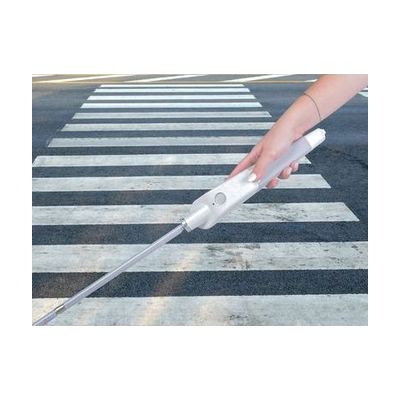
WeWALK Smart Cane - 59 inches
by WeWALK
Price is what the vendor listed when last checked. Confirm it with the vendor before buying.
What it is
Summary
AI-generated from vendor-published content · October 1, 2026
The WeWALK is a smart handle that attaches to a long cane. It vibrates to warn you about low-hanging things like signs or tree branches, which the tip of a cane can miss. Once you pair it by Bluetooth with the WeWALK app on an iPhone or Android phone, you also get turn-by-turn walking directions, public transit stops and timetables, a "what's around me" place finder, and step and distance tracking. This 59-inch version is for someone who already travels with a long cane and wants navigation and extra obstacle awareness built into it. It needs a phone and the app for the smart features, and the cane still has to be used the usual way.
Getting it
Try before you buy
Devices like this are often available to borrow through your state's AT Act program — typically free or low-cost — so you can try it before buying or pursuing funding.
Where to get it
This is the vendor WhatCanHelp tracks for this product — it may also be available from other retailers or a local supplier, and prices vary.
How to fund this
These are common places to ask about paying for equipment like this. Each one decides its own eligibility and what it covers, so start by asking them.
Details
Quick Facts Catalog facts · auto-generated
- Addresses
- Platform
- Age range
- Complexity
- Setup with instructions
- Price
- $599.95
- Funding
- AT Act lending
- Medicaid waiver
- Out of pocket
- Vocational rehab
What setup looks like
- Out of the box
Attach the WeWALK handle to your long cane. The overhead obstacle vibration is built in and works as you walk. - With a guide
- Download the WeWALK app on your iOS or Android phone and pair the cane by Bluetooth.
- Choose your language and set up navigation, transit, and activity tracking in the app.
- Practice with the vibration alerts and phone directions on a familiar route first. Plan on about 30 to 60 minutes.
Compare & explore
Sources & fine print
Vendor facts (name, price, platforms, vendor link) sourced from MaxiAids — view on vendor site (opens in a new tab); last checked November 2, 2026.
Classification & description AI-generated from vendor-published content on October 1, 2026 · confidence: high. Vendor specs may lag; verify before relying on details in a clinical or funding artifact.