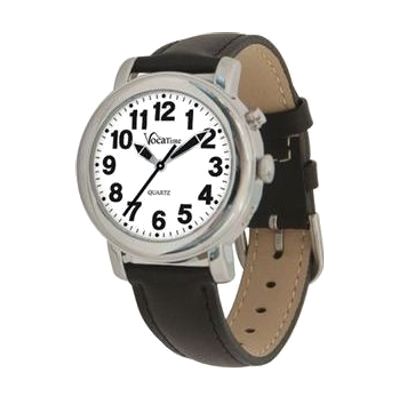
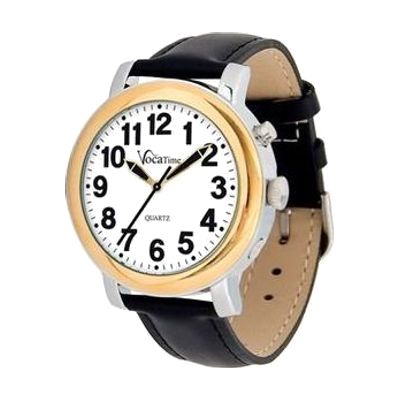
VocaTime Womens Chrome Talking Watch- Black Leather Band
by VocaTime
Price is what the vendor listed when last checked. Confirm it with the vendor before buying.
What it is
Summary
AI-generated from vendor-published content · October 11, 2026
This women's chrome wristwatch speaks the time aloud when you press its one button, so you can check the time without seeing the dial. Press once to hear the time and twice to hear the day, month, and year. You can switch between a male and a female American English voice, and the voice is timed to match the hands, which makes setting the watch easier. It runs on a single battery and has a black leather band; the watch face measures about 1 inch across. A new watch may arrive in sleep mode, and holding the button for a few seconds wakes it.
Getting it
Try before you buy
Devices like this are often available to borrow through your state's AT Act program — typically free or low-cost — so you can try it before buying or pursuing funding.
Where to get it
This is the vendor WhatCanHelp tracks for this product — it may also be available from other retailers or a local supplier, and prices vary.
Wondering how equipment like this gets paid for? See the official funding programs in your state.
Details
Quick Facts Catalog facts · auto-generated
- Type
- Addresses
- Platform
- Age range
- Complexity
- Ready to use
- Price
- $59.95
- Funding
- AT Act lending
- Out of pocket
What setup looks like
- Out of the box
- If the hands aren't moving when it arrives, hold the S1 button (next to 2 o'clock) for 2-3 seconds until the hands start spinning.
- Press S1 once to hear the time, or twice to hear the day, month, and year.
- Check the included manual if you want to change the voice or set the time.
Compare & explore
More low vision aids
Sources & fine print
Vendor facts (name, price, platforms, vendor link) sourced from MaxiAids — view on vendor site (opens in a new tab); last checked November 20, 2026.
Classification & description AI-generated from vendor-published content on October 11, 2026 · confidence: high. Vendor specs may lag; verify before relying on details in a clinical or funding artifact.