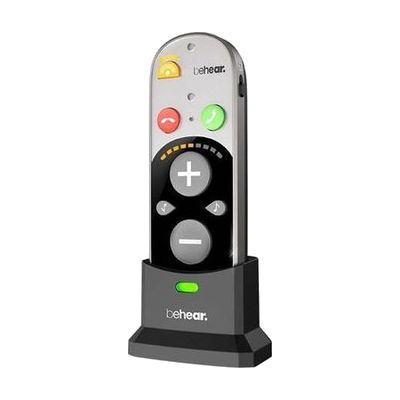
BeHear SMARTO Personal Hearing Sound Amplifier
by Alango
Last verified July 28, 2026 · classified April 26, 2026
What it is
Summary
AI-generated from vendor-published content · April 26, 2026
The BeHear SMARTO is a personal sound amplifier (PSAP) that boosts incoming sound by up to 70dB and connects via Bluetooth 5.0 to smartphones, TVs, and other audio sources. It's designed for someone who struggles to follow conversations or hear the TV clearly but hasn't yet pursued a clinical hearing aid fitting — or who wants an affordable amplification option with wireless audio capability. You get a self-contained, rechargeable device with dual microphone modes (directional for noisy rooms, omnidirectional for quieter settings), noise reduction processing, and phone call controls built into the unit itself. PSAPs like this are not FDA-regulated hearing aids and are not programmed to a personal audiogram, so people with moderate-to-severe or complex hearing loss will typically get better outcomes from a professionally fitted hearing aid.
Quick Facts Catalog facts · auto-generated
- AT Act lending
- Out of pocket
What Setup Looks Like
- Out of the box
- Charge the device fully before first use (2-3 hours).
- Power on and insert the earpiece — basic sound amplification works immediately without pairing.
- With a guide
- Open the companion app on your smartphone and follow the guided hearing self-assessment to personalize amplification settings.
- Pair the SMARTO to your phone via Bluetooth for calls and audio streaming.
- Program the emergency call button with a preset contact number.
- Experiment with directional vs. omnidirectional microphone modes in different environments — allow 1-2 weeks to find preferred settings. See manufacturer support resources for detailed instructions.
Getting it
Try Before You Buy
Devices like this are often available to borrow through your state's AT Act program — typically free or low-cost — so you can try it before buying or pursuing funding.
Where to Get It
This is the vendor WhatCanHelp tracks for this product — it may also be available from other retailers or a local supplier, and prices vary.
Some links may be affiliate links — WhatCanHelp may earn a small commission from purchases at no extra cost to you. More on affiliates →
As an Amazon Associate we earn from qualifying purchases.
Wondering how equipment like this gets paid for? See the official funding programs in your state.
Compare & explore
Sources & fine print
Vendor facts (name, price, platforms, vendor link) sourced from Alango — view on vendor site; last verified July 28, 2026.
Classification & description AI-generated from vendor-published content on April 26, 2026 · confidence: high. Vendor specs may lag; verify before relying on details in a clinical or funding artifact.