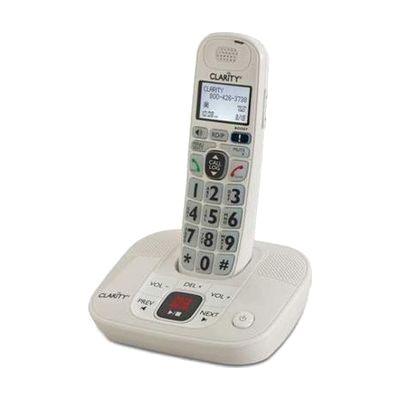
Clarity D714 Loud Low Vision Cordless Telephone with Caller ID Answering Machine
by Clarity
$79.95 ▲ $19.95 (33%)
Price is what the vendor listed when last checked. Confirm it with the vendor before buying.
Last verified September 16, 2026 · classified April 26, 2026
What it is
Summary
AI-generated from vendor-published content · April 26, 2026
The Clarity D714 is a cordless home phone designed for people who have difficulty hearing standard phone calls or seeing typical phone keypads — it amplifies incoming audio up to 40dB and features an unusually large, high-contrast backlit keypad with a big-font caller ID display. It's well-suited for someone who has moderate to severe hearing loss or low vision and wants a complete home phone solution without needing to buy separate amplification equipment. The package includes the cordless handset, base with digital answering machine, and everything needed to start making and receiving amplified calls right away — no apps or additional hardware required. While 40dB of amplification is substantial, people with more profound hearing loss may need a dedicated amplified phone with even higher gain (some competitors go to 50dB or more), so it's worth checking whether this level meets your specific needs before purchasing.
Quick Facts Catalog facts · auto-generated
- AT Act lending
- Medicaid waiver
- Out of pocket
What Setup Looks Like
- Out of the box
- Connect the base to a phone line jack and power outlet.
- Place the handset on the base to charge — phone is ready to use once charged.
- Adjust volume and tone settings directly from the handset controls.
- With a guide
- Program speed dial numbers and phonebook entries using the handset menu.
- Set up answering machine greeting and review playback options — allow 15–20 minutes with the included manual.
Getting it
Try Before You Buy
Devices like this are often available to borrow through your state's AT Act program — typically free or low-cost — so you can try it before buying or pursuing funding.
Where to Get It
This is the vendor WhatCanHelp tracks for this product — it may also be available from other retailers or a local supplier, and prices vary.
Some links may be affiliate links — WhatCanHelp may earn a small commission from purchases at no extra cost to you. More on affiliates →
As an Amazon Associate we earn from qualifying purchases.
How to Fund This
Equipment like this is often pursued through official state programs. These are common starting points — each program decides its own eligibility and what it covers, so the first step is always a phone call.
Compare & explore
Sources & fine print
Vendor facts (name, price, platforms, vendor link) sourced from Clarity — view on vendor site; last verified September 16, 2026.
Classification & description AI-generated from vendor-published content on April 26, 2026 · confidence: high. Vendor specs may lag; verify before relying on details in a clinical or funding artifact.