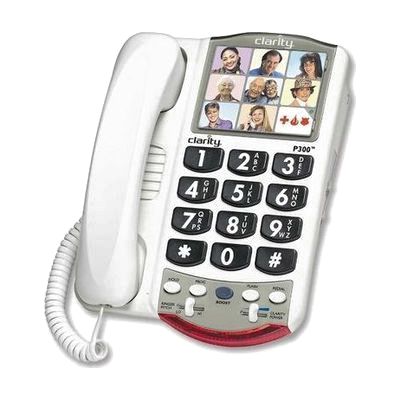
Photo Phone P300 Corded Picture Telephones by Clarity
by Clarity
Price is what the vendor listed when last checked. Confirm it with the vendor before buying.
What it is
Summary
AI-generated from vendor-published content · October 1, 2026
The P300 is a corded phone that makes incoming voices louder and clearer, with up to 18 dB of amplification. It has nine photo memory buttons, so you can call someone by pressing their picture instead of dialing, plus large, high-contrast buttons and a bright flashing light that shows when it rings. It suits someone who misses some words on calls but can still follow a conversation, or who has trouble seeing or remembering numbers. A 3.5mm neckloop jack and hearing aid compatibility let it work with other listening gear. It's a corded phone, so it stays plugged in at one spot in the home.
Getting it
Try before you buy
Devices like this are often available to borrow through your state's AT Act program — typically free or low-cost — so you can try it before buying or pursuing funding.
Where to get it
This is the vendor WhatCanHelp tracks for this product — it may also be available from other retailers or a local supplier, and prices vary.
How to fund this
These are common places to ask about paying for equipment like this. Each one decides its own eligibility and what it covers, so start by asking them.
Details
Quick Facts Catalog facts · auto-generated
- Platform
- Age range
- Complexity
- Ready to use
- Price
- $48.95
- Funding
- AT Act lending
- Medicaid waiver
- Out of pocket
What setup looks like
- Out of the box
- Plug the phone into your phone line and start making and receiving calls.
- Adjust the volume and ringer to what's comfortable for you.
- To set up photo speed dial, add a picture and number to each of the nine memory buttons. This is quick to do and takes a few minutes.
Compare & explore
Sources & fine print
Vendor facts (name, price, platforms, vendor link) sourced from Diglo — view on vendor site (opens in a new tab); last checked October 31, 2026.
Classification & description AI-generated from vendor-published content on October 1, 2026 · confidence: high. Vendor specs may lag; verify before relying on details in a clinical or funding artifact.