Browse Assistive Technology
Products
-

GoTalk Fit
Est. $79–$129
The GoTalk Fit is a small handheld device that speaks recorded messages when someone presses a picture square. You can set it up with 4 or 9 squares per level and use 3 levels, for up to 12 or 27 messages in all. Each message can run up to 20 seconds, and a different colored light shows which level you're on. It's a good fit for a learner who needs to share wants and needs, join in a lesson, or ask a question at school or out in the community. Because the overlay swaps out easily, you can reprogram it for a new class or activity during the day.
Verified 4 days agoSetup with instructions -

GoTalk StepPad
$49.00
The StepPad is a small recorder that plays back spoken directions one step at a time, so someone can get through a multi-step task such as a morning routine without help. You record each step in your own voice, then the user presses Next to hear the next step, Play to hear it again, or Back to review an earlier one. It holds four activities at two levels, with up to 30 steps in each, and any single step can be re-recorded or a new one inserted without disturbing the rest. You can also lock it to one activity so the user doesn't get lost or change the recordings by accident. It's a good fit for someone who loses their place in a sequence or needs prompting to finish a task on their own, and it can serve as a short-term teaching tool or a long-term aid. It's small enough to carry in a hand or purse, with built-in lanyard loops and a belt loop slot.
Verified 2 days agoSetup with instructions -
GoTalk Everywhere
$50.00
GoTalk Everywhere is an AAC app, which means it gives someone a way to communicate through tapping buttons that speak or play recordings. It runs on iOS, Android, and the web, and it syncs communication pages across devices through the cloud. A therapist, teacher, or family member can build pages on the web and send them straight to the person who will use them. You get the basics: text-to-speech, voice recording, symbols, your own photos, and grid layouts from 1 up to 30 buttons per page. It's a good fit for someone who needs a simple, adjustable way to start communicating. The best results usually come from a speech-language pathologist helping choose the vocabulary and page layouts.
Verified 3 weeks agoProfessional guidance helps -
AAC Speak Helper
Free
AAC Speak Helper is a free Windows program that takes text you copy to the clipboard, then translates it, converts it between writing systems (such as Latin to Devanagari), and reads it aloud using text-to-speech voices from several providers. It's meant to be called from another AAC app on Windows that can run outside programs, so it helps most when someone needs to speak a language their AAC app's voices handle poorly. For example, a Ukrainian speaker could have their text turned into English for caregivers. It has no main window of its own, but a separate Configure app lets you set options and keep different settings files for different tasks. You'll need to run the server and client yourself and edit your pagesets to add a speak button, so it's not a plug-and-play tool.
Verified 4 days agoProfessional guidance helps -

Key Chain Talker
$19.00
The Key Chain Talker is a small recorder that holds one eight-second message and plays it back when you press its large button. A light comes on while you're recording, so it's easy to tell when it's working. Because it clips onto a key chain, it suits quick auditory reminders like a shopping item, where you parked, or a spot on your daily schedule. It stores just one short message at a time, so recording a new one replaces the old one.
Verified 3 weeks agoReady to use -

Boogie Board Jot 8.5 LCD eWriter- Blue
$29.99
The Boogie Board Jot 8.5 is a reusable LCD writing tablet. You write on it with the included stylus, and a button clears the screen when you're done. It gives someone who can't speak, or finds speaking hard, a quick way to share a message, a phone number, or a list by writing it out. The screen needs no power to hold an image, so there's no on/off switch. A small amount of power is used only when you press erase. It's a good fit for keeping around the house or office, or for taking along. It's a handwriting tool, so the person needs enough hand control to write or draw. The maker also offers a free Jot mobile app.
Verified 2 days agoReady to use -
GoTalk 9+ Lite Touch
$339.00
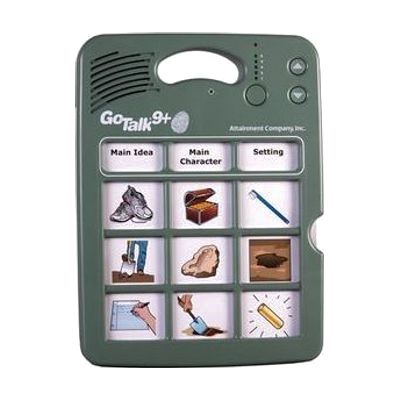
The GoTalk 9+ Lite Touch is a dedicated talking device with nine message keys. You record your own voice messages onto the keys, and each press plays one back. It holds up to 45 messages across five recording levels, with about nine minutes of total recording time, and its keys respond to a much lighter touch than standard GoTalk models, which helps someone with a gentle or limited press. People can use it to start conversations, make requests, answer questions in class, or greet visitors in a hospital room. It has volume control, a record lock and a level lock, and it stores its overlays inside the device. Because every message is recorded by someone, the vocabulary only works as well as it is planned, so it helps to have a speech-language pathologist or teacher decide what goes on each level.
Verified 2 days agoProfessional guidance helps -
Go Talk Fit
$99.00
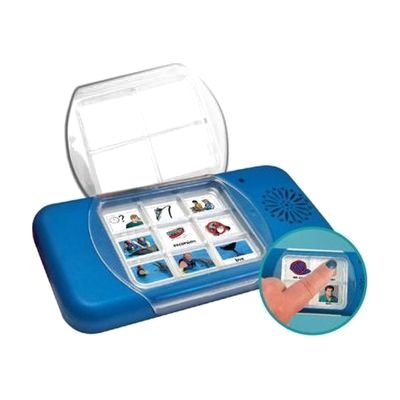
The GoTalk Fit is a small handheld voice output device that plays back messages you record yourself. It comes in a 4-message or 9-message version, and each one holds three levels, so it can store 12 or 27 messages in total. A different colored light shows which level is active, and the size makes it easy to carry into the community. Overlays are not pre-made: you create your own by using the GoTalk Overlay software, writing on a blank template, cutting and pasting pictures or symbols, or adding Velcro and a texture cue to each square. It suits someone who needs a simple, portable way to say a set number of messages, with the choice of vocabulary and layout built around that person.
Verified 2 days agoProfessional guidance helps -

Recordable Cards
Est. $20–$60
These dry-wipe cards each hold a 10-second recorded message that plays back when you press the button on the front. You can re-record the audio whenever you like and write notes or instructions on the wipe-clean surface, which makes them handy for personalized prompts, reminders, practice activities, and simple games. They come in A4 and A6 sizes, and the batteries are included. Each card holds only one short message, so longer instructions need several cards.
Verified 4 days agoSetup with instructions -

SoundingBoard
Est. $10–$50
SoundingBoard is an iPad, iPhone, and iPod touch app that turns the device into a communication board. You build boards with up to 20 message spots, using the built-in AbleNet symbols or your own photos. Each spot can hold a recorded message of almost any length, so a touch speaks a message in a voice you choose. It suits someone who needs to make choices or share simple messages and has a caregiver, teacher, or family member to build and record the boards. Because it runs on a larger iPad screen as well, the buttons can be made bigger. The app is also offered in French, German, and Spanish. Taking photos inside the app isn't supported on the previous-generation iPod touch or iPad 1.
Verified 4 days agoSetup with instructions -

VoiceBooster 12 Watt Portable Voice Amplifier MR1505
$79.95
The VoiceBooster is a small, wearable voice amplifier that makes a quiet voice louder through its built-in 12-watt speaker. It comes with a headset microphone, a waistband, a removable belt clip, a shoulder strap, and a carry bag, so you can wear it hands-free. It suits someone with a vocal disability, and also teachers, guides, coaches, and presenters who need to be heard. It also has an input for an MP3 player or other audio source, and it can play both the microphone and that audio at once. It runs on a built-in rechargeable battery rated for 10-15 hours per charge.
Verified 2 days agoReady to use -
Grid Pad Go
Est. $1,500–$3,500
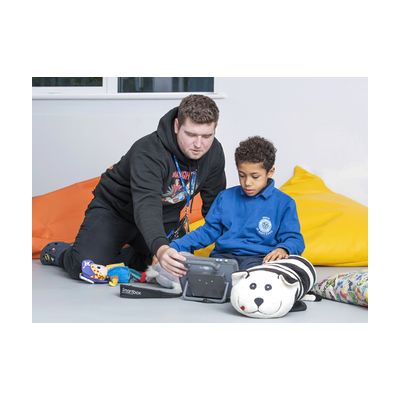
The Grid Pad Go is a portable, tough communication device that runs Smartbox's Grid software, so a person can speak with symbols or text and have the device say it aloud. It has a tactile handle and strap, can be mounted to a wheelchair, and is drop tested to 1 meter with extra screen protection. For people who can't tap a screen easily, it has two switch ports, oversized buttons, and an optional keyguard (a plate that guides the finger to the right spot). Grid also gives access to apps like WhatsApp, Instagram, and Facebook, and it supports a range of voices as well as a personalized voice. The page lists it for people whose speech is affected by conditions such as autism, cerebral palsy, early MND/ALS, stroke, or aphasia.
Verified 4 days agoProfessional setup required -

Talking Photo Album Deluxe
Est. $50–$90
The Talking Photo Album Deluxe lets you slip a photo or picture onto each page and record a spoken message to go with it. Pressing the page's play button plays the message back, and you can re-record it whenever you like. That makes it useful for telling stories, sharing a daily schedule, or jogging memories. It has a built-in speaker with adjustable volume plus an earphone socket for private listening, and recordings stay saved when you change the batteries. You can also load WAV or MP3 files over USB. The page count and recording time are stated inconsistently (30 double-sided pages versus 20 pages, 2 hours total), so check the details before ordering if capacity matters to you.
Verified 4 days agoSetup with instructions -
iTalk2
$215.00
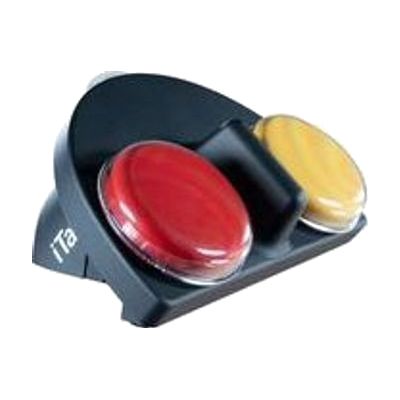
The iTalk2 is a simple two-button talking device. Pressing the red or yellow top plays a recorded message, so someone can pick between two choices, like yes or no, or two foods or activities. You can record new messages quickly, or use the levels to pre-record up to three sets ahead of time. A clear snap cover holds picture symbols so the person can see what each button means. The soft-touch coating is easier to hold, and the digital sound is built to work in most settings. Symbol overlays are not included, but AbleNet offers a free iPad app for making them.
Verified 4 days agoProfessional guidance helps -

Via
Est. $1,500–$8,000
The Via is a speech-generating device built on iOS, so it looks and feels familiar to anyone who has used an iPhone or iPad. It runs research-based AAC apps, including TouchChat, LAMP Words for Life, and WordPower. The family has several models: the Pro, the compact and durable Nano, and the Mini, which is also durable and portable. This is a complete communication device for someone who can't rely on speech. Choosing the right model, app, vocabulary, and way to access it is a big decision, so an evaluation with a speech-language pathologist helps.
Verified 4 days agoProfessional setup required -
Grid for iPad from Smartbox
Est. $99–$349
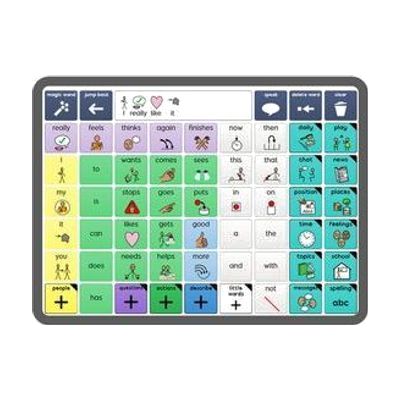
Grid for iPad is an AAC app, which means it helps someone who can't rely on speech to communicate by speaking for them from the iPad. It's built as a full communication platform, with ready-made resources for both symbol-based and text-based communication, so it can fit someone who builds messages from pictures as well as someone who types. You get a library of resources included. It runs on an iPad, so you'll need one, and picking a vocabulary layout and setting it up for the person's needs goes more smoothly with input from a speech-language pathologist.
Verified 4 days agoProfessional guidance helps -

simPODD
Est. $30–$100
simPODD is an iOS app for using PODD communication books, a paper-based way of communicating that some people use with a communication partner. It aims to make communicating feel more natural and to speed up printing the pages. It comes from the team that makes Proloquo2Go.
Verified 4 days agoProfessional guidance helps -

ChatterVox Voice Amplifier with Pencil Mic
$248.75
The ChatterVOX is a portable voice amplifier you wear like a fanny pack. It makes a quiet voice louder by 12 to 18 dB, so it suits someone whose voice is weak, whether that is temporary or long-term. The waistband is woven nylon and adjusts up to 44 inches. A pencil microphone is included, and the kit also comes with a charger, rechargeable batteries, and a case. Because the unit is worn at the waist, your hands stay free while you talk.
Verified 2 days agoReady to use -

Voice Pad
Est. $40–$80
The Voice Pad is a simple recordable device: press the red button to record up to 40 seconds of sound, then press the green button to play it back. It comes as a pack of five, so a classroom or group can use several at once. A clear cover with a dry-wipe insert lets you add a picture or words that match each recording, and a lock switch protects a message from being erased by accident. A built-in mirror adds something to look at and explore, and the pad can sit on a table with its kick stand, hang on a wall, or stick to a metal surface with its magnet. It holds only one short message per pad, so it suits single words, phrases, or sound effects rather than anything longer.
Verified 4 days agoReady to use -
GoTalk Connect
$849.00
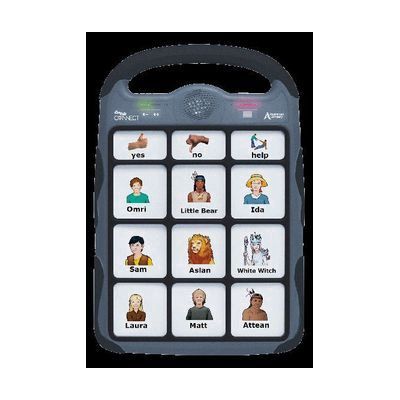
GoTalk Connect is a rechargeable, dedicated communication device that speaks recorded messages aloud. It holds up to 250 messages and uses interchangeable grids, so the layout of buttons can be swapped to fit different activities or settings. It also comes with software for creating communication overlays, which means someone needs to build and prepare the grids before they're useful. It's a stand-alone solution, so there's no phone or tablet to manage.
Verified 4 days agoProfessional guidance helps -
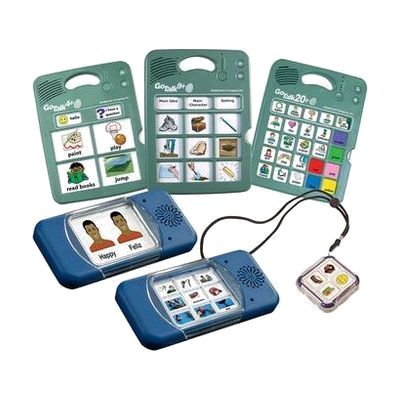
GoTalk Multi-Message Bundle
Est. $200–$450
This bundle gives you several GoTalk communication devices in different sizes, so you can match the number of choices to what a person can handle. The three Lite Touch models (4+, 9+ and 20+) each hold recorded messages across five levels, with a few core buttons that stay the same on every level. The Lite Touch buttons activate with very little pressure. The GoTalk Duo is a simpler two-message device with improved sound. Because each device has to be recorded and set up, it's a good fit for someone who needs speech support at more than one stage, or for a team trying out sizes before settling on one. The page text cuts off before listing everything in the bundle, so check the full contents before ordering.
Verified 4 days agoProfessional guidance helps -

Communication Boards
Est. $80–$400
These are large printed symbol boards that you mount on a wall or fence so people can point to pictures to communicate, in places like school playgrounds, libraries, hospitals, and swimming pools. There are 10 designs based on Super Core grid sets, in two sizes (1189 x 420mm or 1682 x 594mm) and two materials: rigid Dibond that you screw or nail up, or PVC banners with eyelet loops that you secure with cable ties. Both work indoors or outdoors, and you can have up to 8 cells customized with nouns, equipment, or key places for your location. The listing says the boards are sold only in the UK and Ireland and priced by quote, so check ordering options before planning around them.
Verified 4 days agoSetup with instructions -

Apple Live Speech & Personal Voice
Free
Live Speech lets you type what you want to say and have your device say it out loud, including during Phone and FaceTime calls and face-to-face conversations. You can save phrases you use often and group them into categories, such as a Coffee Shop set for ordering. You can pick from dozens of system voices or use a Personal Voice, which is a voice you create that sounds like you. Personal Voice is built by reading 10 randomized phrases aloud, and it's aimed at people who are at risk of losing their voice. These are built-in Apple features, so availability varies by device, region, and language.
Verified 3 days agoSetup with instructions -
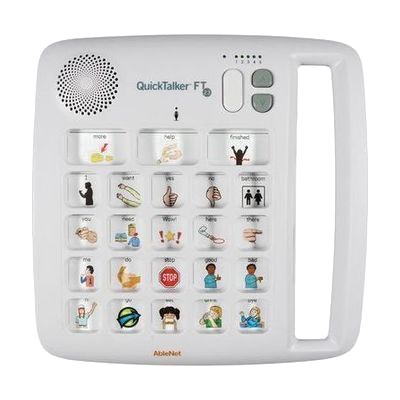
QuickTalker FT 23
Est. $200–$450
The QuickTalker FT 23 is a portable communication board that speaks recorded messages aloud when someone touches a message square. It holds 103 messages across five recording levels: three core messages stay the same on every level, and each level adds 20 of its own, so you can set up one level for reading, another for the lunchroom, and so on. The FeatherTouch surface takes about 70% less force to activate, which helps someone with limited strength or dexterity. It runs on included AA batteries and has a built-in carrying handle. A person still has to record the messages and plan what goes on each level, so it works best with help from a speech-language pathologist or teacher.
Verified 4 days agoProfessional guidance helps